





Explore the complete Boox Palma 2 Pro specs, key upgrades, performance details, and everything you need to know before buying this powerful e-ink mini reader.
Table of Contents
After testing the Boox Palma 2 Pro, I think it’s the best mobile-like device for reading and writing anywhere without any problems.
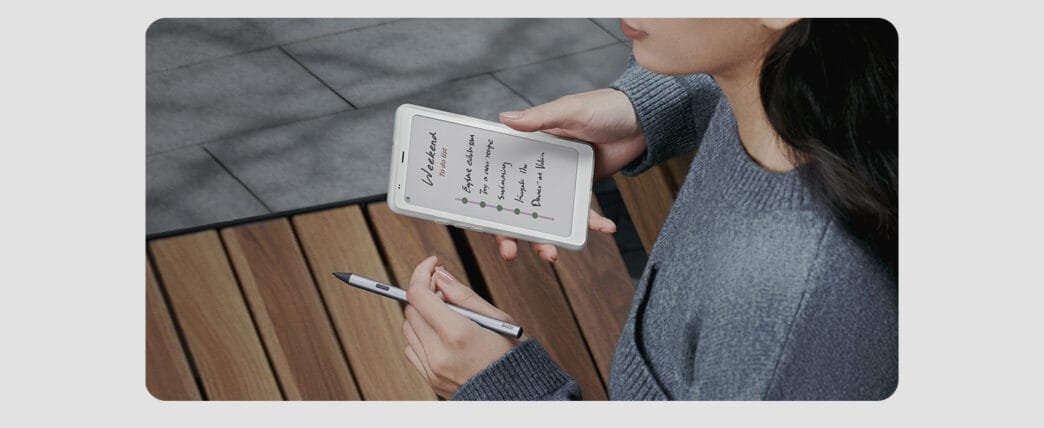
The Boox Palma 2 Pro is one of the most compact devices you can choose if you like to read and write in electronic ink, as if you had a mobile phone in your hands. 
Is it a tablet, an e-book reader, or a mobile? After testing the Boox Palma 2 Pro, I think it’s the perfect device if you’re looking for a hybrid that allows you to read and write very comfortably anywhere.
This is because its design is really similar to that of a common mobile, with a weight that is even lighter than the market average, but also because of the incorporation of a panel with electronic ink.
Usually, it is difficult to find a reader of this type, also in what corresponds to its interior, since it has Android 15 as its operating system, so you will find your content in the Google Play Store.
All this with the great news that here you will not have blue light, as is the case in the vast majority of devices, except for some terminals that offer ink as a complement, such as the TCL NXTPAPER 11 Plus.
Practically all readers on the market tend to arrive with a larger size, appearing the same as a small book, even larger in those that increase their diagonal to that of a tablet.
Therefore, the Boox Palma 2 Pro is a great option if you need the most portable on the market in this type, although its price exceeds 300 euros, so you should consider the purchase very well.

Boox Palma 2 Pro, review and review
This Boox device has the best of a mobile phone for those looking for electronic ink on one of the most portable screens.

Mobile ePaper eBook Reader 8G 128G 150PPI
Features of Boox Palma 2 Pro
Boox Palma 2 Pro |
|
|---|---|
| Screen | Kaleido 3 6.13″ (4,096 colors) Black and white: 824 x 1,648 px (300 ppi) Color: 412 x 824 px (150 ppi) Backlit display |
| Processor | Octa-core |
| GPU | Adreno |
| RAM | 8 GB |
| Storage | 128 GB |
| Main cameras | 16 MP |
| Battery | 3,950 mAh |
| Operating system | Android 15 |
| Dimensions and weight | 159 x 80 x 8.8 mm175 g |
| Extras | Dual SIM, SD card, and Fingerprint reader |
| Price | $399 |

The big advantage is that it is as portable as a mobile phone, but it comes with a screen
The best part of the Boox Palma 2 Pro is that it can reduce its size to that of a mobile phone, even with a weight of 175 grams—more commonly associated with ultralight devices—with this screen.
Of course, it is much thicker, and that is noticeable, especially if you use it together with the case, which is somewhat rough, although it protects the terminal perfectly, since its imitation paper finish might not be enough.
With the intention of being a mobile aimed at those who do not use the usual tools much—such as the camera—but who take notes or read with it, it adds a slot for dual SIM or a SIM next to an SD card.
I think it is unrivaled in this regard, plus it also includes a basic rear camera if you need it at any time, although it is practically anecdotal in its results.
As for its screen, the great attraction of this type of device is a 6.13-inch Kaleido 3 backlit panel with 4,096 colors, the same one that the manufacturer uses in the Boox Note Air5 C.
Otherwise, it has a fingerprint reader on the side of the mobile, in the same place as the one intended for the lock button, so it is a great option to have a little more security.

Very fair performance, but it arrives with Android 15
As far as its performance is concerned, the truth is that the Boox Palma 2 Pro adds an 8-core processor that does not have much to contribute to more normal applications.
Admittedly, you’ll get 8 gigabytes of RAM, better than the Note Air5 C’s 6 gigabytes, although it’s only enough for very normal tasks, without having a lot of open services.
You notice some portraiture when you press any Android 15 menu, something also typical of its screen, but you can choose any library outside Boox, something you will need to be able to have books, unless you install them from a local file.

You will have it for a whole day without problems, although you will have to think carefully when you load it
As for its autonomy, the Boox Palma 2 Pro arrives with a 3,950 mAh battery, the same as you could find in a mid-range mobile, for example.
Thus, it lasts perfectly for about 8 hours with prolonged use to read documents, take notes, or navigate between applications.
Although you will have to think very carefully when you charge it, since to have it at 100% you will need just over 2 hours, in my case, I have chosen to charge it at night.
It has a 16-megapixel camera, although I think it’s dispensable
Interestingly, the Boox Palma 2 Pro has a very basic 16-megapixel rear camera, in case you need to take any pictures.
Although after the tests, and if you take into account the type of screen of this device, it will not serve you for very decent photographs, but rather in case you need to read a document, for example.
I think that, today, it is something that can be dispensed with, especially considering that documents can be easily shared to read them more comfortably here.
❓ Frequently Asked Questions & Answers
-
Q1. What are the Boox Palma 2 Pro specifications?
A1. The Palma 2 Pro features a 6.13″ Kaleido 3 color E-Ink display (monochrome 300 ppi; color 150 ppi), octa-core CPU + BOOX Super Refresh, 8 GB RAM, 128 GB storage (expandable via microSD up to 2 TB), runs Android 15 with Google Play pre-installed, has Wi-Fi, Bluetooth 5.1, and optional 5G data via a hybrid SIM slot, and includes a 3950 mAh battery, fingerprint unlock, dual-tone front light, and optional stylus support (InkSense Plus).
-
Q2. How does the Boox Palma 2 Pro compare to other e-readers?
A2. Compared with many traditional monochrome e-readers, Palma 2 Pro stands out by offering a color E-Ink screen, Android 15 with Google Play (so you can run many apps), stylus support for notes/annotations, and 5G/data SIM connectivity — features closer to a compact tablet than a pure e-reader. At the same time, its E-Ink display offers the eye comfort and readability advantages common to e-readers, making it a hybrid between e-reader and smart device.
Be a part of over Success!
- Stay ahead of the curve with the latest tech trends, gadgets, and innovations! Newsletter
- Share your feedback or connect with me on LinkedIn — I’d love to hear from you!