






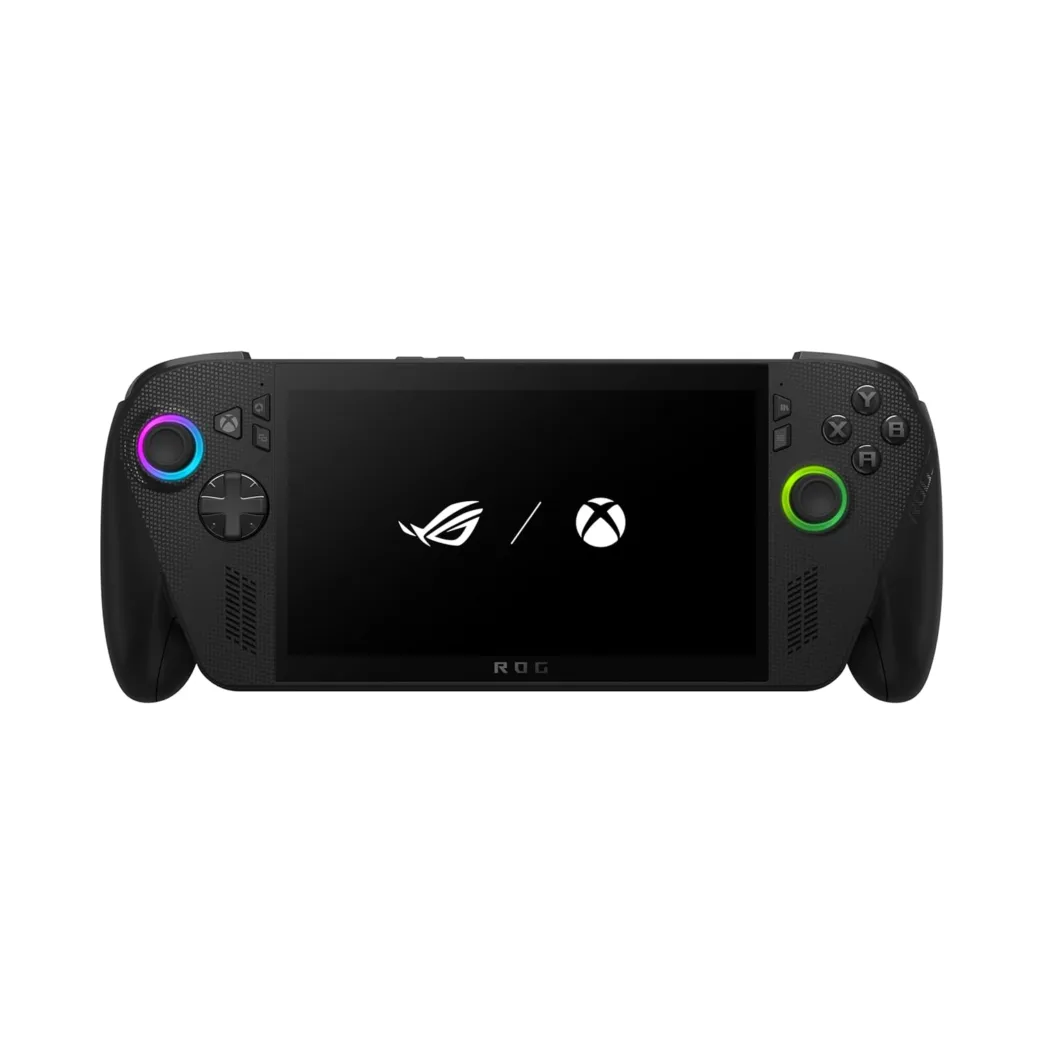
Discover how ASUS ROG XBOX Ally X brings smarter tweaks and improved power for Indian gamers seeking the ultimate handheld gaming experience.
Table of Contents
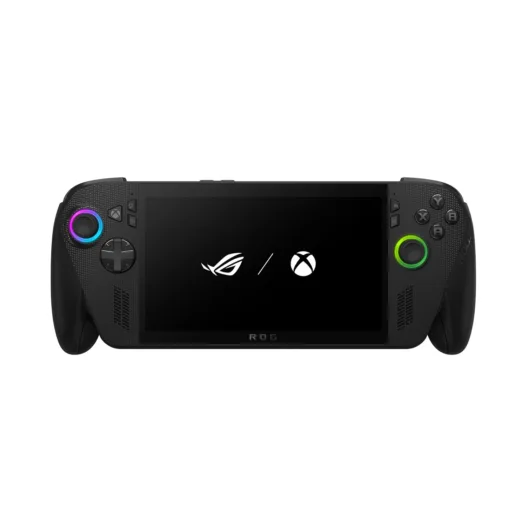
The ROG Xbox Ally X is a very particular portable console. At first glance the concept seems the same as we saw about two years ago in the ASUS ROG Ally, but in reality we have important changes that translate into improvements that go beyond performance.
One of those improvements is in the design of the console, which enhances ergonomics and grip to achieve a more comfortable user experience. Another improvement we have internally is that the hardware has received such big changes that we are facing a notable generational leap in terms of performance. 
The third improvement is also very important, and it is the optimization of the gaming side of this console that, in the end, is still based on Windows 11. Microsoft’s operating system has been customized in such a way that it offers functions and optimizations typical of a console.
In general, the sensations that the ROG Xbox Ally X transmits on paper are more attractive because it is presented as a more authentic, better finished, and better profiled portable console than other models based on Windows 11. In practice, does it live up to the expectations it has generated? Keep reading; we are going to tell you about it in this review.

ROG Xbox Ally X Specs
Chassis, measurements, and weight
- Case made of plastic with a textured finish.
- Dimensions: 29 x 12.1 x 2.75 ~ 5.09 cm.
- Weight: 715 grams.
Control system and buttons
- The control system is inspired by the Xbox controller.
- Two analog sticks, one on each side, located at different heights and with customizable RGB LED lighting.
- The D-pad is located a little below the left analog stick.
- X, Y, B, and A buttons.
- Two top buttons and two triggers with Hall effect, one on each side.
- Dedicated buttons for game library, context menu, ROG Armoury Crate command center, Xbox app, and view.
- Two customizable buttons to create macros, one on each side of the back.
- Control buttons for volume.
- Power button with fingerprint reader.
- Haptic feedback (vibration).
Display, Resolution, and Color
- 7-inch IPS 10-point touchpad with 1080p resolution.
- It covers 100% of the sRGB space and 75.35% of the Adobe space.
- 120 Hz refresh rate, compatible with AMD FreeSync Premium.
- 500 nits brightness.
- Gorilla Glass Victus protection and a DXC anti-reflective layer.
- It offers viewing angles of 178 degrees.
Processor and GPU
- The AMD Ryzen AI Z2 Extreme APU is manufactured on TSMC’s 4 nm node.
- 8-core, 16-thread CPU. Three Zen 5 cores at 2 GHz-5 GHz, normal and turbo mode, and five Zen 5c cores at 2 GHz-3.3 GHz, normal and turbo mode.
- The CPU has 8 MB of L2 cache (1 MB per core) and 16 MB of shared L3 cache.
- The Radeon 890M GPU is based on the RDNA 3.5 architecture with 1,024 shaders, 64 texturing units, 32 raster units, 16 second-generation cores for lightning tracing acceleration, and 2 MB of L2 cache.
- The GPU runs at a maximum of 2,900 MHz and can reach a peak power of up to 5.93 TFLOPs in FP32.
- XDNA 2 NPU with a power of 50 TOPs, compatible with Copilot+ and capable of offering advanced AI functions.
- Maximum TDP of 35 watts, split between CPU, GPU, and NPU.
Memory and Storage
- 24 GB of LPDDR5X at 8,000 Mbps.
- Shared memory interface with GPU and CPU (unified).
- High-performance PCIe Gen4 x4 SSD storage unit with 1 TB capacity.
Connectivity, battery, and external storage
- Wired: Two USB 4 Type-C ports supporting Thunderbolt 4, DisplayPort 1.4, and power and a 3.5 mm jack for sound input and output.
- Wireless: Triple-band Wi-Fi 6E (6 GHz, 5 GHz, and 2.4 GHz) in 2 x 2 configuration and Bluetooth 5.4.
- UHS-II microSD card reader.
- 80 Wh battery compatible with fast charging.
Sound and cooling system
- Two stereo speakers with Dolby Atmos sound and Hi-Res certification.
- Smart amplifier.
- AI noise-canceling microphone array.
- Zero Gravity cooling system with two fans that introduce cold air from the rear and push hot air from the top.
Operating system, pre-installed software, and price
- Windows 11 Home as the operating system.
- It comes with the Xbox and ROG Armoury Crate apps pre-installed.
- Price: from ₹1,14,990.

AMD Ryzen Z2 Extreme, 24GB RAM, 1TB SSD, 7″ FHD Touchscreen 120Hz, 500 nits, Win 11 Home, Black, 715g, AMD Radeon, Gaming Handheld PC (RC73XA-NH016W)
ROG Xbox Ally X External Review and First Impressions
This console uses a chassis made of textured plastic. The sensations it transmits to the touch are good, the quality of construction is at the level of a product of its range and price, and I have not appreciated any soft or structural fragilities that could compromise the integrity and useful life of it.
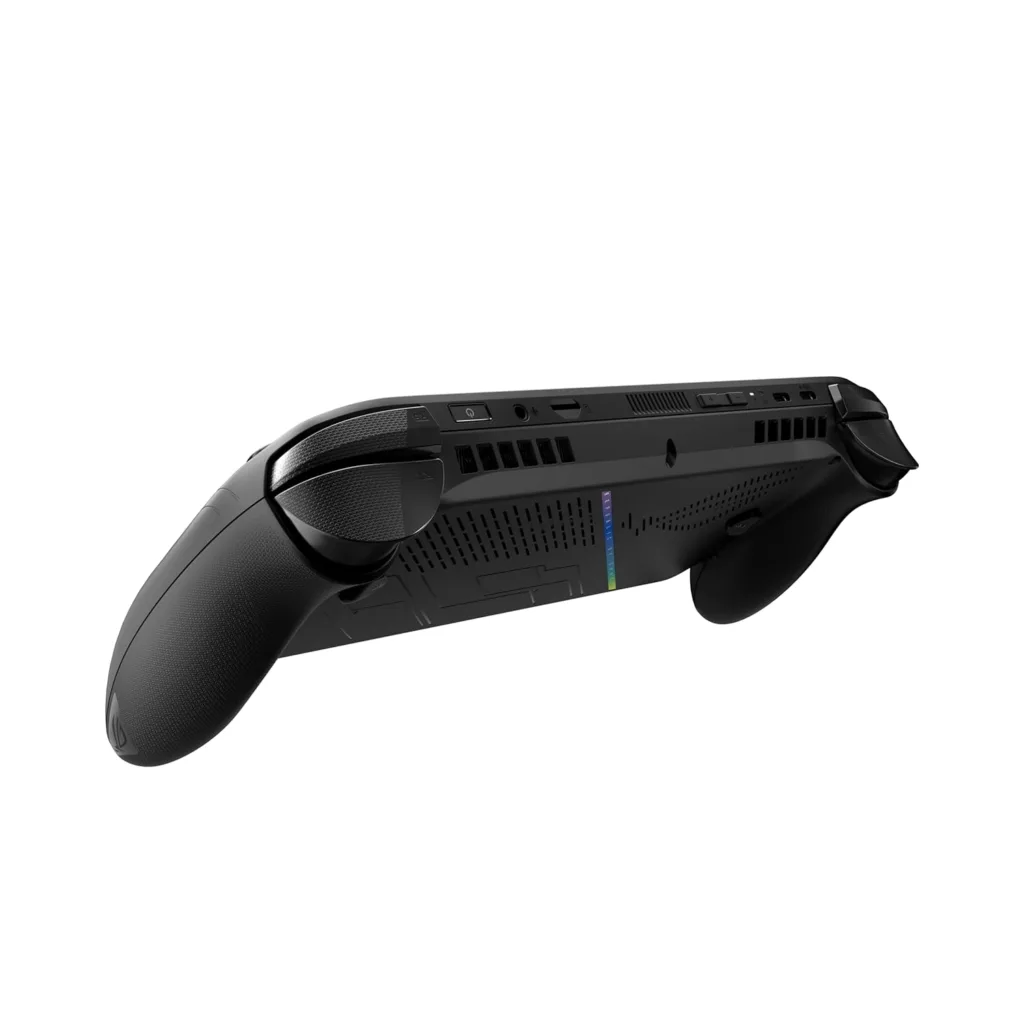
We have details from the ASUS ROG line that give it a very marked gaming touch in different parts of the console, although the logos on the bottom of the side grip plastics stand out, as does the logo located on the back as a grille and the iridescent strip that changes color depending on the position in which we have the console.
The ROG Xbox Ally X is larger and heavier than the ASUS Xbox Ally, but this does not have a negative impact on the user experience; in fact, the opposite happens because ASUS has been able to take advantage of that increase in size and weight to improve the ergonomics of the console.
We have a wider grip area with a curved line that really reminds us of a console controller, which improves grip and makes playing much more comfortable, even after several hours of continuous use. On the front of the attachment area we have a smooth finish, and on the back a textured finish.
The distribution of the buttons is correct, as we can reach each and every one of them effortlessly with a natural and comfortable grip. The quality of the same is also at the height of the whole. The analogue sticks are protected by a high-strength textured rubber, and the sensations that the buttons convey with each press are typical of a conductive membrane system.
The feel of the top buttons is correct, and the triggers have a good travel. The D-pad is a fairly tight size, but it marks the route well and will not give us problems when executing movements in games where it is quite recommended, such as fighting titles.
The placement of the cooling system is very clever. ASUS has mounted two turbine-type fans, one on each side, just in the area immediately behind the curvature of the control system. These fans collect cold air from the outside through the chassis grilles and introduce it inside, pushing the hot air through the upper area of the chassis.
The hot air comes out through an area away from both the screen and the buttons, which means that it never bothers us and that it does not affect our user experience. It’s also very quiet, even when we’re playing demanding titles.
On the top of the chassis we have the two USB 4 ports, the 3.5 mm jack, and also the volume control buttons and the power control button, which incorporates the fingerprint reader. They are placed on a different plane from the hot air outlet area, are easily accessible and do not obstruct each other in any way.
ROG Xbox Ally X hardware-level review
Under the hood we have a Ryzen AI Z2 Extreme APU, a chip with a monolithic design (CPU, NPU, and GPU in the same package) that is specifically designed to be integrated into high-performance portable consoles where consumption and heat play a very important role.
Its configuration of 8 cores divided into three Zen 5 cores and five Zen 5c cores allows a better balance between multithreaded performance, consumption, and heat generated, without giving up a significant increase in IPC compared to the previous generation, which was based on the Zen 4 architecture.
Having 8 cores and 16 threads allows us to reach an optimal level to run demanding games optimally, as we exceed the recommended minimum of 6 cores and 12 threads.
The Radeon 890M GPU is one of the most powerful in its class. Being based on the RDNA 3.5 architecture, it is fully compatible with DirectX 12 Ultimate and with all the technologies used by the most advanced graphics engines. It accelerates ray tracing and supports FSR 3 and frame generation.
Its performance level places it as a solution capable of running games in 1080p resolution without fluidity problems while maintaining a good level of quality in many cases, even when working with a very tight level of consumption.
With those credentials, it’s easy to understand why ASUS has mounted a 1080p display on this console. The 120 Hz refresh rate is consistent with the ROG Xbox Ally X specs, and AMD FreeSync Premium support ensures a totally stuttering- and tearing-free experience.
And speaking of the display, this one has optimal color reproduction for a laptop, a good pixel density per inch, a well-tuned brightness level, and perfect viewing angles at 178 degrees. In the attached gallery you can appreciate the quality of the screen in detail. Clicking on it will enlarge the images.
The 24 GB of memory LPDDR5X at 8,000 Mbps is no coincidence. The integrated GPU uses this memory as VRAM, and this configuration allows us to reserve 8 GB for the Radeon 890M and leave the other 16 GB free. This way we can play any game without memory problems, and we have a 256-bit bus to maximize bandwidth.
The SSD included in the ROG Xbox Ally X has a capacity of 1 TB, enough not to run out of space in the short term, and reaches a high speed in both sequential reading and writing, far exceeding the values of the Xbox Series X, a guarantee of fluidity, as we will see later.
The stereo sound system is up to the task, and it is so good that it manages to generate positional sound effects in games, playing with the intensity and output of voices and other sounds depending on the position they come from in the game we are using. Very good work by ASUS in this regard.

ROG Xbox Ally X user experience
As soon as we turn on the console, we are greeted by the Windows 11 configuration interface. It’s logical, because as I told you, this operating system is the basis of the console. However, when we finish the configuration process, we are welcomed by the Xbox application, which asks us to identify ourselves with an existing account or create a new one.
In my case I have had an account since the days of Xbox 360, and it is the one I still use today. Once identified, I find an interface perfectly designed for a portable console. Microsoft has taken care of all the details and has optimized the operating system to reduce background processes as much as possible, all in order to improve performance in what really matters: games.
The Xbox application works as a kind of nexus where we can centralize our gaming experience, but don’t worry, we can also use the dedicated applications of the main game distribution platforms, such as Steam, Epic Games Store, Good Old Games, and others.
Through the Xbox application we can also make different settings and access different functions, such as Xbox Remote Play and Xbox Cloud Gaming, and also new technologies such as Gaming Copilot, which uses the console’s NPU to work as a personal assistant that will offer us recommendations, advice, and help in general.
Another of the most important new features that Microsoft has introduced to improve the gaming experience is “Advanced Shader Delivery,” a technology that I already talked about in this article and that uses the cloud to provide pre-compiled shaders along with driver information in compatible games.
These shaders are automatically downloaded and updated when new drivers are released, which greatly improves the gaming experience, as it simplifies and improves the issue of preloading shaders, with all that this entails in terms of performance. This technology made an appearance when I ran Indiana Jones and the Great Circle, and it worked flawlessly.
To configure, control, and customize our ROG Xbox Ally X, we have the ROG Armoury Crate application preinstalled. Its design and operation are similar to that of the version we tested at the time on the ASUS ROG Ally, but in this new console, changes have been introduced in the interface that offer better integration by categories and that make everything more organized and intuitive.
Through this application we can customize different things, such as the control system, RGB LED lighting, sound, and screen profile. We can also choose between different performance modes, calibrate the analog sticks, control the memory allocated to the GPU, update the equipment, and do many more things, all with a very complete and well-profiled interface.

Performance modes with console plugged in:
- 35 watts (turbo).
- 17 watts (performance)
- 17 watts (Windows).
- 13 watts (quiet).
Performance modes with the console in battery mode:
- 25 watts (turbo).
- 17 watts (performance)
- 17 watts (Windows).
- 13 watts (quiet).
Everything runs excellently smoothly on the Xbox and ROG Armoury Crate apps, and the same can be said for Windows 11. We can access the desktop of said operating system without problems, and the experience is solid and consistent, both in terms of performance and interface. In this sense, the touch screen plays a very important role, as it makes interactions direct and much faster.
Installing games and apps is a breeze, and Runtimes and launch times are very fast. When playing, The control system is perfectly responsive., the controls are fully optimized and defined to suit any game, and the accuracy of the analog sticks and buttons is good.
The gaming performance is surprisingly good for a portable console, since we can even play titles as demanding as DOOM: The Dark Ages and Indiana Jones and the Great Circle. You’ll be happy to know that we can really take advantage of its 1080p display, although we’ll go into more detail about this when talking about the concrete performance results in games.
The cooling system works perfectly, both for the temperatures it maintains and for its low noise level, and as I told you before, it fulfills the task of preventing the heat from bothering us. At no time did we notice it, because the hot air outlet path is intelligently designed to keep it away from our hands, and from the screen.
In portable mode, and with the 17-watt profile activated, the loss of performance is noticeable compared to the 35-watt profile, but we have enough power to continue to enjoy a good experience in most of the games I have tested in this review, as we will see later. I leave you a video so you can see how well Days Gone works in 1080p with medium quality and textures at the maximum with the 17-watt profile.

ROG Xbox Ally X performance analysis in applications
In this round of tests we are going to see what this new console is capable of by measuring its performance at the level of CPU, GPU, and SSD with different benchmarks that are capable of bringing those components to 100% use.
These tests will also allow us to assess the stability and frequency scaling of the CPU. All tests have been passed in the 35-watt mode, unless otherwise specifically stated in each test.
Performance in Cinebench R23
A performance test that measures CPU power using a demanding rendering scene. The scores are very good in both single-thread and multi-thread, with 1,927 and 14,624 points, respectively.
We have a notable jump against the Ryzen Z1 Extreme, which gets 1,693 points and 12,458 points.

Performance on 3DMark CPU
Another test with which we can measure the performance of the CPU, but in this case several subtests are run that measure the power of the processor with different active threads.
The scores are within expectations; we have good single-thread performance and optimal scaling as the number of active threads increases. There is hardly any difference between 16 threads and the maximum thread count because the Ryzen AI Z2 Extreme can handle 16 threads at most.
Let’s see how the processor behaves in each subtest and how it scales:
- With an active wire, the maximum speed is 5.03 GHz, very stable, and with a temperature of 79.24 degrees C.
- With two active wires, the speed remains stable at 5.03 GHz, and the temperature moves at 89.50 degrees C.
- With four active wires we have fluctuations in speed, which move between 5.03 GHz and 4.62 GHz. The temperature reaches a peak of 92.25 degrees C.
- With eight active threads, the trend of the previous test is repeated, with a peak of 5.03 GHz and a minimum falling below 4.5 GHz. The temperature exceeds a 92-degree C peak.
- With 16 active threads, the speed still fluctuates quite a bit, and we have oscillations between 5 GHz and 4.4 GHz. The maximum temperature is 93 degrees C.
- With all active wires, we have the same maximum number of wires as in the previous case, which is why the score is so similar, and the same happens with the frequency and temperature values, with oscillations between 4.4 GHz and 5 GHz and a temperature peak of 92 degrees C.
By clicking In the attached gallery, you can see in more detail the graphs of frequency, temperature, and processor use in each subtest.
Performance in 3DMark Night Raid
This test measures the performance of the GPU in a scenario comparable to not very demanding games. The score we have graphically is very good considering that we are using an integrated low-power solution, and the same can be said for the CPU value.
These results indicate that the ROG Xbox Ally X can seamlessly run games from the previous generation of consoles.
Performance in 3DMark Time Spy
This test measures performance in a scenario comparable to demanding games. The first screenshot shows the results with the ROG Xbox Ally X using the 17-watt mode, and the second with the 35-watt mode, which we can only activate with the console plugged in.
With the 17-watt mode, the GPU score is 2,908, and with the 35-watt mode, it goes up to 3,620 points. The difference is small, and this is positive, because it indicates that we will be able to maintain a good level of performance even in portable mode.
The difference in the overall score is 25.77% between the 17-watt mode and the 35-watt mode, an optimal result considering that the TDP difference is a little more than double.
Performance on CrystalDiskMark
With this test we measure the performance of the SSD. The ROG Xbox Ally X mounts a high-performance SSD that achieves more than 5 GB/s in sequential read and more than 4.1 GB/s in sequential write, thus surpassing the performance of the Xbox Series X SSD, which reaches 2.4 GB/s.
NPU performance in AI under Procyon
This test allows us to measure the power in AI loads of the XDNA2 NPU mounted on the Ryzen AI Z2 Extreme. Those 1,677 points in INT8 represent a good result and indicate that we have a very capable NPU.

ROG Xbox Ally X Gaming Performance Review
The ROG Xbox Ally X is a handheld console, and as such, its main purpose is to play, so let’s dive right in now to see how it has performed in some of my favorite titles.
I’ve chosen very different games, both in terms of genre and level of demand, and I’ve included both current-gen and previous-gen exclusives to show you the potential of this console in the most realistic way possible.
Settings used in games
- DOOM The Dark Ages: 1080p, medium quality, texture reserve in 3 GB, and FSR 3.1 in ultra-performance mode.
- Red Dead Redemption 2: 1080p, low quality, textures in ultra, and FSR in quality mode.
- Cyberpunk 2077: 1080p, ultra quality, crowds on high, and FSR 3.1 in quality mode.
- Days Gone: 1080p, medium quality, textures at the maximum.
- Dying Light 2: 1080p, medium quality, and FSR 2 in quality mode.
- Indiana Jones and the Great Circle: 1080p, low quality, native resolution.
- Resident Evil 4 Remake: 1080p, high quality, FSR in quality mode.
- A Plague Tale: Requiem: 1080p, low quality, textures maxed out, native.
Even titles as demanding as DOOM: The Dark Ages, which uses ray tracing natively, run smoothly on the ROG Xbox Ally X. This game runs at 37 FPS with medium quality, texture reserve at 3 GB, and FSR 3.1 in ultra performance mode.
In all games used, the ROG Xbox Ally X maintained at least 30 FPS, which is equivalent to a playable experience. In Red Dead Redemption 2, with low quality, ultra textures, and FSR in quality mode, we have 67 FPS, which leaves us a lot of room to raise the quality to a medium-high level and stay above 40 FPS.
In Cyberpunk 2077 we can achieve an average of 76 FPS in 1080p with ultra quality if we activate FSR 3.1 in performance and frame generation mode. The experience when playing with that setup is pretty good.
With the 17-watt mode, which is the most recommended for gaming in portable mode if we want to balance performance and consumption, we have a pretty good experience as long as we use FSR or other upscaling technology.
For example, in Cyberpunk 2077 we can play with 1080p resolution and the graphics quality settings at ultra while maintaining 31 FPS with FSR 3.1 in performance mode. If we activate frame generation, the frame rate goes up to 49, and the fluidity improves a lot.
The performance loss in Cyberpunk 2077 when moving from 35-watt mode to the 17-watt profile is 44%. Not bad, as we have reduced the TDP by more than half.
Not bad at all, especially considering that we’ve reduced the TDP to just 17 watts. With that same performance profile, we can play Days Gone in 1080p with medium quality and textures at maximum with stable averages between 30 and 40 FPS, even in scenes with a large number of monsters.
Temperature and frequency scaling
ASUS has done a very good job with the ROG Xbox Ally X’s cooling system. With basic use we have very low temperature values and an almost negligible noise level. In games, temperature values stay below 80 degrees C most of the time even with the 35-watt mode activated.
The frequency scaling of the Radeon 890M is adequate, and this allows for consistent performance even in scenarios where a larger part of the TDP budget must be allocated to the CPU. Cyberpunk 2077 is the best example of this, as it moves a large number of NPCs, and this consumes more CPU.
Activating the 17-watt performance profile cuts the Radeon 890M’s speed in half, but scaling is still consistent, and as we’ve seen in gaming performance testing, that TDP reduction doesn’t cause the FPS rate to drop by half.
The minimum of 862 MHz was recorded in the built-in benchmark of Cyberpunk 2077, just as we entered the final area where we have many NPCs on the street. In this section, CPU usage increases, and so the speed of the integrated GPU decreases, because the integrated GPU receives more of the available TDP.

Battery Charge Range
The ROG Xbox Ally X has an 80 Wh battery and comes with an APU that has low-power cores based on the Zen 5c architecture, so I was convinced that its autonomy was going to be very good.
In the Procyon video playback test, with the screen brightness at minimum and the RGB LED lighting disabled, we achieved a total autonomy of 17 hours and 21 minutes, a spectacular result that shows the good work ASUS has done with this console.
In games, with the 17-watt profile, the brightness of the screen high, and the RGB LED lighting activated, we can get almost 4 hours of autonomy in Days Gone with the configuration that I have indicated in the section dedicated to performance tests.

AMD Ryzen Z2 A Processor,16GB RAM, 512GB SSD, 7″/17.8cm, FHD, Touchscreen,120Hz, 500 nits, Windows 11 Home, White, 670g, RC73YA-NH010W,AMD Radeon Graphics, Gaming Handheld PC
ROG Xbox Ally X vs. ASUS ROG Ally
The ROG Xbox Ally X offers a significant improvement in terms of autonomy compared to the ASUS ROG Ally, since, as we see, it is capable of touching four hours of autonomy in Days Gone with the 17-watt profile, while the second barely reaches 1 hour and 38 minutes with the 15-watt profile.
This improvement is due to its increased battery capacity and also its Ryzen Z2 Extreme AI SoC, which is more powerful and more efficient. In this respect, the Zen 5c cores make an important difference.
The SSD mounted on the ROG Xbox Ally X is also faster than that of the ASUS ROG Ally, as we can see in the attached graph. The difference is especially large in sequential write operations.
Performance-wise, the ROG Xbox Ally X performs almost 30% better in Resident Evil 4 Remake with the 35-watt profile and 45% better with the 17-watt profile. We have a significant performance improvement, especially in the 17-watt profile, as it makes the difference between playable and unplayable.
In Cyberpunk 2077 we can also see a very big performance improvement, especially since we are running this game with ultra quality on the ROG Xbox Ally X and we can still exceed 30 FPS, something that would not be possible on the ASUS ROG Ally, where we have the game set to medium quality.
Even with that higher level of graphics quality, we have almost the same performance in the ROG Xbox Ally X with the 17-watt profile.
In CPU performance the difference is also very large between the two consoles. The ROG Xbox Ally X scores 1,927 points in single-threaded compared to 1,693 points for the ASUS ROG Ally, and in multi-threaded the former wins by 14,624 points to 12,458 points.
Working temperatures are a very important issue, and in this regard we have very good results, as the ROG Xbox Ally X is able to maintain cooler temperatures despite using a higher TDP. The average values are totally safe, despite the fact that we have a high peak of 93 degrees C.
The user experience has also improved compared to the ASUS ROG Ally, especially when it comes to ergonomics. The new design of the grip area makes playing much more comfortable, the D-pad behaves better, and we have an additional USB Type-C connector, something that is certainly appreciated.

Conclusions and final assessment
The ROG Xbox Ally X meets its three major goals, which are:
- Achieve a major leap against the ASUS ROG Ally.
- Improve its integration as a portable console.
- Offer a better experience as a portable console.
In terms of design and build quality, ASUS has done a good job with this console, especially in terms of ergonomics, which have been greatly enhanced, and it makes it possible to play for longer with greater comfort. It has also had a positive impact on the control system and the accessibility of the buttons.
The increased integration of the Xbox app, the use of an optimized Windows 11, and the technologies it has released, such as advanced shader delivery, bring it much closer to the concept of the traditional console and also have a positive impact on the user experience.
Another point that has improved significantly is performance, and the best thing is that it has been achieved without sacrifices in terms of autonomy, and without having to shoot up working temperatures. The ROG Xbox Ally X offers such good performance that we can play demanding titles in 1080p with upscaling under the 17-watt profile while maintaining totally safe temperatures.
The cooling system does its job and works with a very low noise level. This makes the user experience better and allows us to better appreciate the sound quality, which borders on a very good level for a portable console. A point in its favor, since it allows us to use it without having to resort to headphones.
The screen is another of its strengths, both in terms of pixel density and color reproduction, refresh rate and AMD FreeSync Premium technology, which frees us from stuttering and image breakage. It is true that an OLED panel could have been used, but this would have increased the final price of the console quite a bit.
ASUS has also been able to correct other shortcomings that we had in the ROG Ally, and has expanded the memory from 16 GB to 24 GB, something that is essential to ensure a long lifespan. It hasn’t forgotten to improve connectivity either, and has included two USB 4s in the ROG Xbox Ally X, making it a more balanced, rounder, and better-finished console.
The ROG Xbox Ally X has met my expectations. The most purists will say that it is still not a real portable console, and that it is a consoled PC. They are partly right, but this model has improved a lot compared to the previous ones, enjoys greater integration with the Xbox application, brings optimizations and technologies that make a difference and bring it closer to that concept of console, and offers an optimal experience in games with 1080p resolution.
FAQ from Content
-
Q1: What makes the ASUS ROG Ally X different from its previous version?
A1: The ROG Ally X features clever hardware and software tweaks that improve performance, design, and portability compared to the previous ROG Ally.
-
Q2: Is the ROG Ally X suitable for Indian gamers?
A2: Yes, the ROG Ally X is designed to deliver powerful handheld gaming performance that meets the expectations of Indian gamers.
-
Q3: What are the key upgrades in the ROG Ally X?
A3: Key upgrades include improved processing power, enhanced graphics, refined design, and optimizations for smoother gaming performance.