









Table of Contents
Adobe has taken a significant step forward with the launch of Acrobat Studio, an environment that turns traditional PDF files into authentic interactive knowledge centers. This evolution leaves behind the idea that PDF is just a static container, allowing users to interact with information dynamically, creatively, and with the support of personalized artificial intelligence.
Since its inception in 1993, PDF has been the standard for digital documentation. With over 3 trillion files in circulation, it has become the preferred format for preserving and sharing important content. Acrobat Studio redefines your role, integrating conversational and creative capabilities into a single space.
PDF spaces: from file to dialog
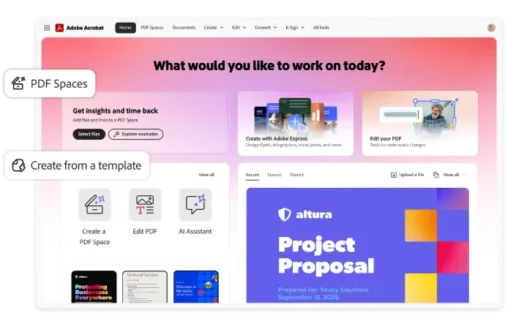
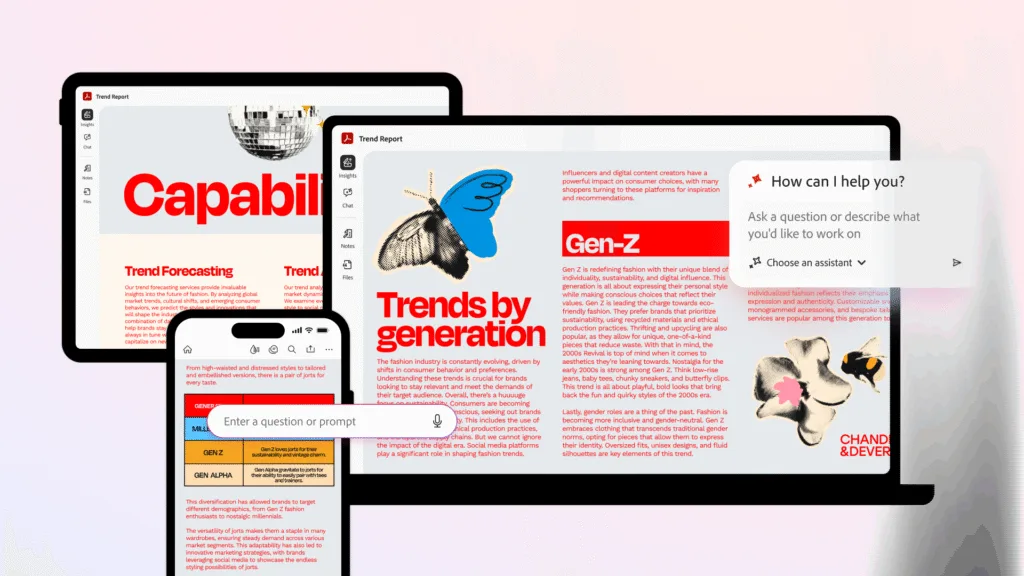
One of the pillars of Acrobat Studio is PDF Spaces, a feature that allows you to group PDF files, web pages, and other resources in a shared, interactive environment powered by AI assistants. These assistants not only answer questions but can also take on roles such as “analyst,” “instructor,” or even “animator,” adapting their language and style to the needs of each user. 
This system facilitates the understanding of complex documents, such as mortgage contracts or technical manuals, synthesizing the information and generating clear and contextualized answers. In addition, it is possible to customize the assistants with specific roles according to the objective of the project, which is especially useful in academic, business, or creative environments.
These spaces can also be shared with others, including configured AI assistants, allowing colleagues, clients, or classmates to access the same knowledge base, interact with it, and collaboratively extract relevant information.
Adobe Express at the service of visual productivity
Creating visual content has become an essential part of daily work. With Adobe Express Premium integrated into Acrobat Studio, users can design everything from infographics to social media posts without leaving the work environment. This includes access to professional templates, branding tools, and the power of Adobe Firefly, which offers generative AI generation of images and videos from text.
This allows, for example, a sales team to turn a dense report into a clear and visually appealing presentation for their customers or for a student to create a visual study guide from their notes and research.
Reliable PDF tools with an extra boost of intelligence
Acrobat Studio does not replace but rather enhances the classic PDF tools that millions of users already know. Documents can still be scanned, e-signed, edited, or merged with complete confidence. But now, a layer of artificial intelligence is added capable of summarizing scanned documents, analyzing contracts, generating insights and facilitating decision-making.
For example, a legal team can consolidate multiple regulatory documents, identify recent regulatory changes, and share key summaries with the rest of the team, all within the same platform. Or a finance manager can quickly generate charts with highlighted metrics for an executive presentation using Adobe Express visual tools.
Security and control for professional environments
Aware of privacy and compliance needs, Adobe designed Acrobat Studio to deliver world-class enterprise security. The system uses advanced encryption and isolation of environments and allows centralized deployment in organizations. Importantly, AI only accesses documents that the user explicitly chooses, thus ensuring full control over the data.
Each quote or response provided by AI assistants is accompanied by a direct link to the original source of the document, allowing the information to be easily validated. This is crucial in sectors such as finance, legal, or health, where the veracity and traceability of data are essential.
Use cases that showcase its versatility
Acrobat Studio’s hands-on apps span multiple profiles. A student can consolidate sources for research, generate automatic citations, and convert their notes into concept maps. A consumer can review, understand, and sign legal contracts from their mobile without the need for external assistance. And a marketer can design a visual campaign directly from the reports and analytics generated by AI assistants.
All of this is done from a single interface, without the need to switch between applications or waste time exporting files or copying content. The integration between document productivity and visual intelligence allows ideas to go from concept to execution in a matter of minutes.
Access and prices
Acrobat Studio is available in English now, with a 14-day free trial that allows you to explore PDF Spaces, AI wizards, and Adobe Express Premium without restrictions. Then, prices start from 24.99 USD per month for individual users and 29.99 USD for teams, which positions it as an accessible tool considering the breadth of functionalities it offers.
Frequently Asked Questions (FAQ)
-
Q1: What is Acrobat Studio and how is it different from traditional PDF tools?
A1: Acrobat Studio is Adobe’s new environment that transforms traditional PDF files into interactive knowledge centers. Unlike static PDFs, it integrates conversational AI assistants and creative capabilities, allowing users to interact with documents dynamically and get contextualized answers from their content.
-
Q2: What are PDF Spaces and how do they work?
A2: PDF Spaces allow you to group PDF files, web pages, and other resources in a shared, interactive environment powered by AI assistants. These assistants can take on specific roles like “analyst,” “instructor,” or “animator” and can be shared with colleagues, clients, or classmates for collaborative work.
-
Q3: Does Acrobat Studio include design capabilities?
A3: Yes, Acrobat Studio includes Adobe Express Premium integration, allowing users to create visual content like infographics and social media posts without leaving the platform. It also provides access to professional templates, branding tools, and Adobe Firefly for AI-generated images and videos.