




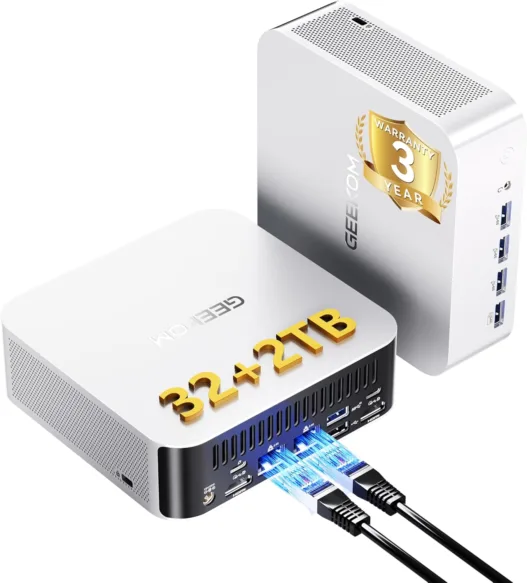
Discover the standout features of the GEEKOM A9 Max AI mini PC in this full review, perfect for productivity and entertainment.
Table of Contents
The GEEKOM A9 Max AI is presented as one of the most advanced and powerful mini PCs out there. This new model boasts specifications that are typical of a high-end computer, and yet it has a price that places it within what we can consider as mid-range.
At first glance its price-performance value is very interesting, but is it really up to par? In this analysis we are going to check it, and we will do so with an exhaustive measurement of its performance in different areas, including games, demanding applications, and advanced AI applied to different areas.
We will also look at the thermal and consumption values, and we will talk about the noise, its connectivity options, the stability it is able to maintain during intensive workloads, and the user experience it offers in general. With all this, we will draw a series of conclusions that will help you decide whether or not the GEEKOM A9 Max AI is worth buying.
GEEKOM A9 Max AI Specs
Chassis, measurements, and weight
- Reinforced metal chassis capable of withstanding a pressure of up to 200 kilograms.
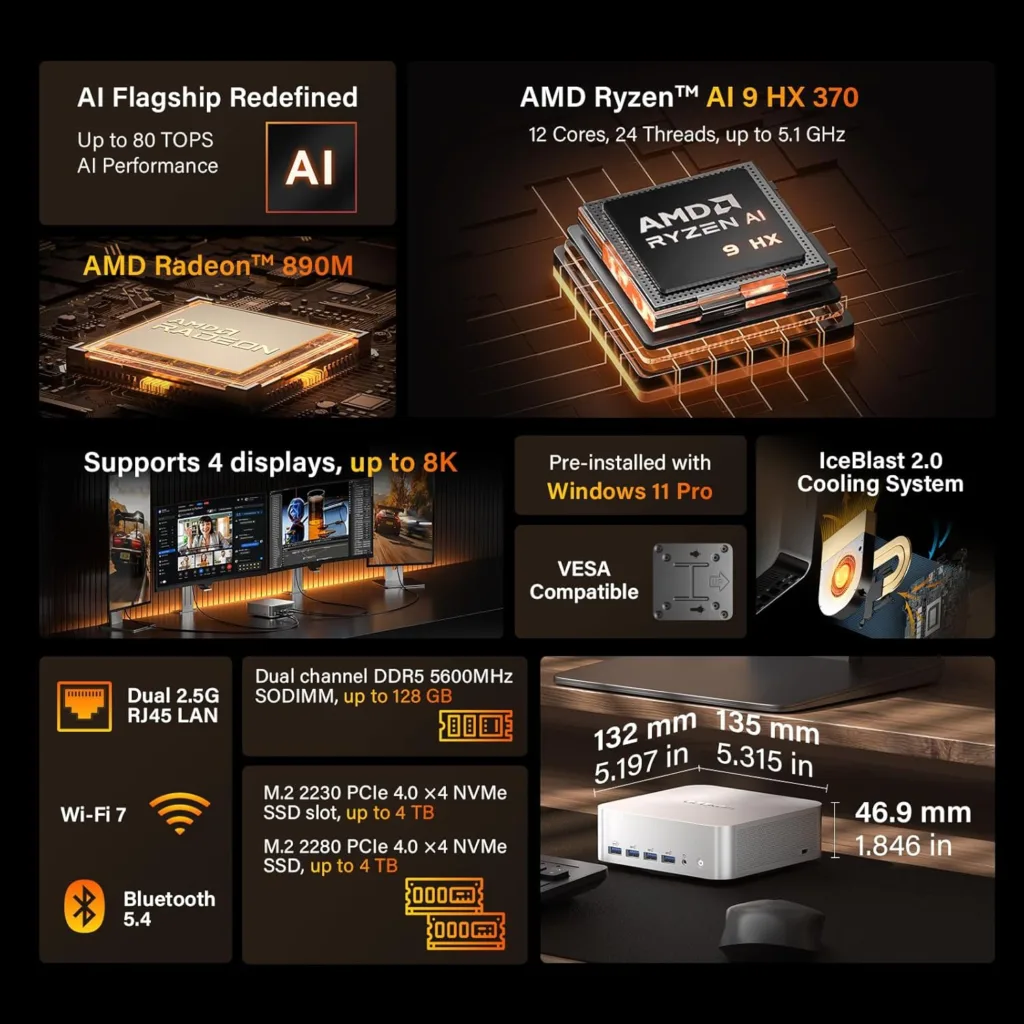
- Measurements: 135 x 132 x 46.9 millimeters.
- Weight: 709 grams.
Base Components
- Ryzen AI 9 HX 370 APU with CPU, iGPU, and NPU.
- AMD Ryzen CPU with 12 cores and 24 threads, divided into 4 Zen 5 cores at a maximum of 5.1 GHz and 8 Zen 5c cores at a maximum of 3.3 GHz. It has 12 MB of L2 cache and 24 MB of L3 cache.
- Radeon 890M integrated GPU with 1,024 RDNA 3.5 shaders, 64 texturing units, 32 raster units, 16 second-generation cores for lightning tracing acceleration, and 2 MB of L2 cache. It has a maximum power of 5.93 TFLOPs in FP32.
- AMD XDNA 2 NPU with a power of 50 TOPs. Exceeds the 40 Microsoft Copilot+ TOPs requirement.
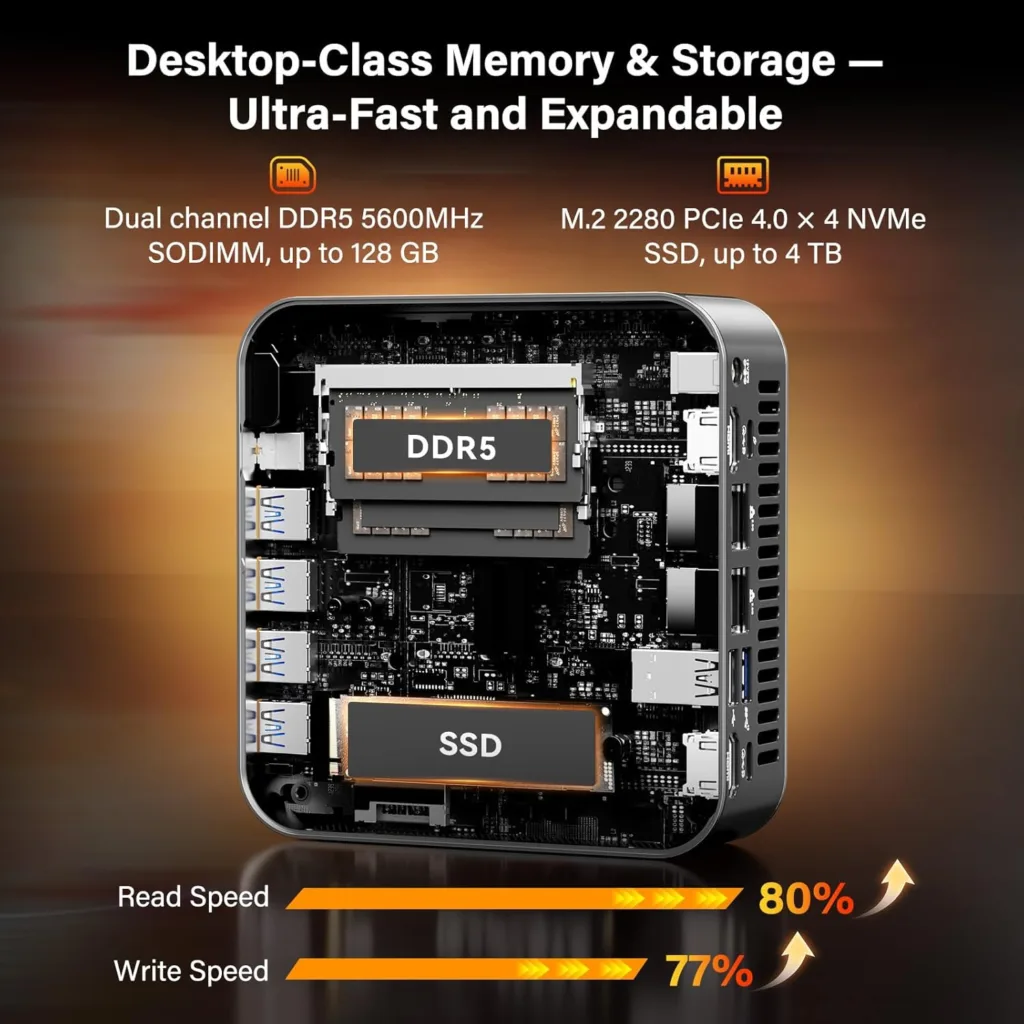
- 32GB DDR5 (2 x 16GB) at 5,600 MT/s, expandable to 128GB.
- Pre-installed 2TB M.2 2280 PCIe Gen4 x4 SSD.
- Additional M.2 2230 PCIe Gen4 x4 slot.
Cooling and sound system
- IceBlast 2.0 cooling system, with a copper contact base and two copper heaters that collect heat from the Ryzen AI 9 HX 370 APU and take it to a copper radiator, on which a turbine-type fan with large blades is placed that pushes cold air and accelerates the exit of hot air from the rear.
- Realtek integrated sound.
Wired and wireless connectivity
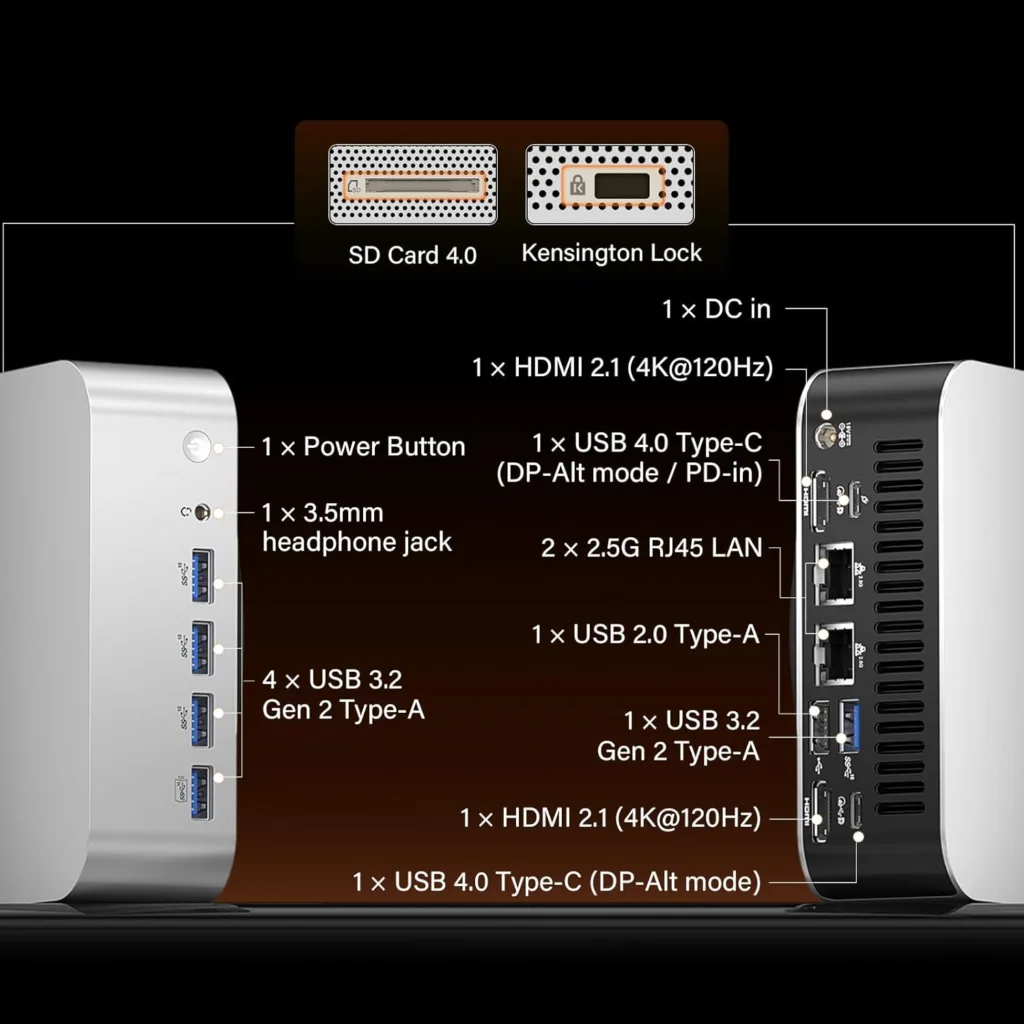
- Rear: Two HDMI 2.1 outputs, two USB 4 Type-C ports with DisplayPort and power support, two 2.5 Gbps Ethernet LAN connectors, one USB 2.0 Type-A port, one USB 3.2 Gen2 Type-A port, and one power connector.
- Front: four USB 3.2 Gen2 Type-A ports and a 3.5 mm headphone jack.
- It has an SD card reader and a Kensington lock.
- Wireless connectivity: Wi-Fi 7 and Bluetooth 5.4.
Operating system, warranty, and price
- Windows 11 Pro pre-installed.
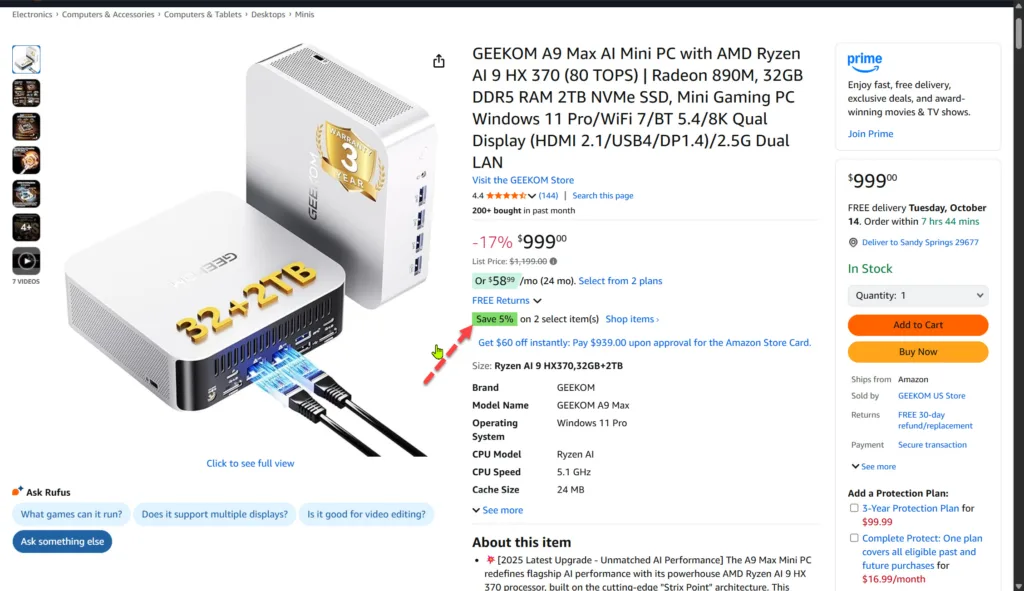
- 3-year warranty.

AMD Ryzen AI 9 HX 370 (80 TOPS) | Radeon 890M, 32GB DDR5 RAM 2TB NVMe SSD, Mini Gaming PC Windows 11 Pro/WiFi 7/BT 5.4/8K Qual Display (HDMI 2.1/USB4/DP1.4)/2.5G Dual LAN
GEEKOM A9 Max AI External Review & Box Contents
GEEKOM includes in the box of its products everything we need to start using them, and it does not forget the VESA mounting kit. We even have the HDMI cable, so we just have to connect it to a monitor, plug in a keyboard and mouse, and voila, we can start the process of configuring Windows 11, which is the operating system that comes preinstalled.
The GEEKOM A9 Max AI transmits very good sensations to the touch. Its metal chassis has perfect structural solidity, has a minimalist line with a silver finish that generates a nice contrast with the rear, which is finished in black, and successfully combines straight lines with a slightly rounded hole in the corners.
On the front we have a total of four USB 3.2 Gen2 Type-A connectors and a 3.5mm headphone jack, making it easy to connect peripherals, storage drives, and headphones. On the back it has two USB 4 ports with DisplayPort and two HDMI outputs, which means that we can connect up to four screens.
Also on the back are two Ethernet LAN connectors at 2.5 Gbps, which will allow us to take advantage of high-speed wired connections, and it has two USB Type-A ports, something very useful if we want to connect the keyboard and mouse by cable and disguise it, since we will have an easier time hiding the wiring.
Its wide range of connectors makes the GEEKOM A9 Max AI a mini PC capable of covering not only the needs of demanding and advanced users but also having a place in professional spaces. As we will see later, this is supported by its good performance and stability, and by its low noise level.
The arrangement of the connectors is correct; we can use them all at the same time without any problem due to lack of space or proximity, and it allows a very simple VESA mounting behind a monitor or a television, thanks to the included kit.
At the base we have four non-slip rubber feet, which we can remove to remove the screws that will give us access to the interior of the GEEKOM A9 Max AI. We can expand the RAM to 128 GB, and we also have a second slot for an M.2 SSD in 2230 format.
GEEKOM claims that this mini PC has passed more than 330 hours of stability tests without failure and that it has undergone other resistance and durability tests to ensure a high degree of reliability, such as vibration resistance tests, more than 15,000 cycles of connection and disconnection of USB ports, and 120 hours of extreme temperature tests.
User experience with the GEEKOM A9 Max AI on Windows 11
As soon as we turn on the computer, we are greeted by the configuration process. This did not take me more than a few minutes, it was completed the first time and without any problem. When I arrived at the Windows 11 desktop, I could see that this operating system works with total fluidity on the GEEKOM A9 Max AI.
Windows 11’s response is instantaneous, basic applications open and close almost immediately, and basic office automation, web browsing, and multimedia tasks are no challenge for this team. We have enough resources to enjoy advanced multitasking with perfect performance, and we can also tackle editing tasks with guarantees.
Very good experience in the most common usage scenarios, and the low noise level of the GEEKOM A9 Max AI’s cooling system stands out with moderate workloads. It is almost imperceptible, and this makes it a highly recommended option for environments where good performance is necessary, but at the same time silence is not negotiable.
The wired connectivity works perfectly, and its compatibility with Wi-Fi 7 allows us to connect to the 6 GHz network and enjoy a high level of performance. If we are close to the router or the Wi-Fi repeater, this network is the most recommended because it is the least saturated and the one that reaches the highest speed.
Thanks to the NPU that mounts the GEEKOM A9 Max AI, we can enjoy the full potential of Copilot+ in Windows 11, including functions such as the co-creator of Paint, AI image generation, live subtitles, and much more. It is a very important added value, especially for creatives and professionals.
GEEKOM A9 Max AI Performance Analysis in Applications and AI
After that first contact with the GEEKOM A9 Max AI, which leaves us with a very positive user experience in basic tasks and in widely used office and multimedia applications, we now move on to see the results that this equipment has obtained in different tests and applications, which measure performance at the level of CPU, GPU, RAM, and SSD.
3DMark CPU
With this test we measure CPU performance with different workloads, ranging from one to the maximum number of threads possible. In this case, the Ryzen AI 9 HX 370 can work with a maximum of 24 threads.
The scores are good and live up to what you would expect from the Ryzen AI 9 HX 370 in its default settings, both single-threaded and multi-threaded, meaning we have no thermal throttling issues that affect the processor’s peak performance.
Here is a summary of how the Ryzen AI 9 HX 370 has performed in each subtest, both in terms of speed and temperature.
- With an active wire we have a speed of 5.13 GHz and a very stable peak temperature of 74.88 degrees C.
- With two active wires, the maximum speed is again 5.13 GHz with very small variations, and the temperature reaches 83.88 degrees C.
- With four active wires we have a maximum speed of 5.13 GHz, although here there are more marked oscillations. The maximum temperature is 87.50 degrees C.
- With eight active wires, the maximum speed drops to 5.09 GHz, and we have a maximum temperature of 87 degrees C.
- With 16 active wires, the speed reaches 5.11 GHz and the temperature peaks at 83.88 degrees C. This test lasts a very short time, so the temperature does not reach beyond.
- With all active threads the speed reaches 5.11 GHz, but we have large fluctuations, and the average speed is low at 5 GHz. The maximum temperature does not exceed 84 degrees C.
Good results in general, both for frequency scaling, since we exceeded 5 GHz peak in all subtests, and at no time did we reach 90 degrees C. This confirms the good work that GEEKOM has done with the cooling system of this mini PC.
3DMark Time Spy
This test measures a computer’s performance in a scenario similar to that of a demanding game. The CPU score is very good, and the GPU performance is correct for an integrated solution. For comparison, a Radeon 680M is usually around 2,100 with a moderate TDP, and the Radeon 780M is placed around 2,500 points.
Blender
This test allows us to measure the performance of a GPU in rendering and uses the value of samples per minute. More is better, and the Radeon 890M mounted on the GEEKOM A9 Max AI achieves a fairly discreet result, as we can see in the image. It’s not surprising, since Blender gets along better with NVIDIA GeForce graphics.
Cinebench R23
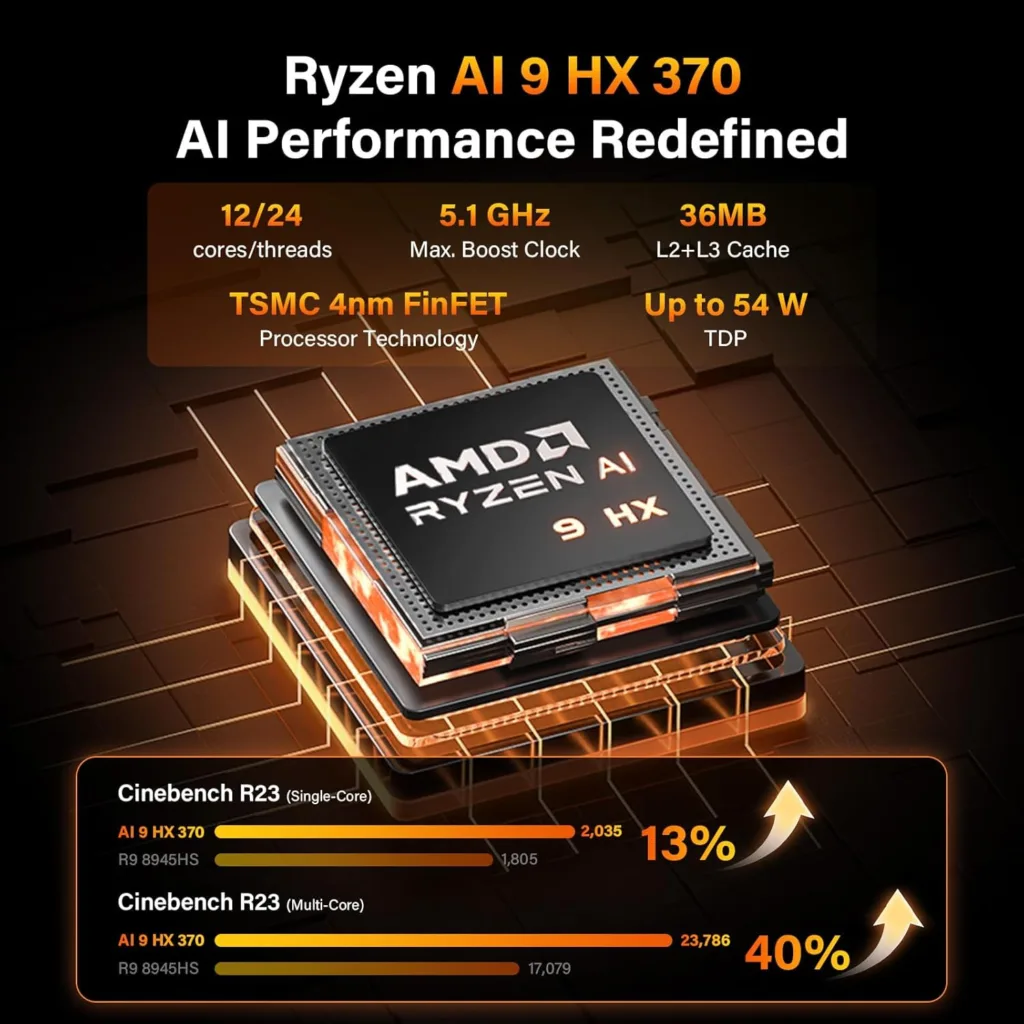
Another render test, but by CPU. The Ryzen AI 9 HX 370 achieves an excellent result in both single-threaded and multi-threaded, reaching 2,033 and 21,762 points, respectively, making it one of the most powerful low-power processors out there.
Cinebench 24
This is an updated version of the previous one, and we also rendered a very demanding scene using the CPU. We have a score of 120 in single-thread and 1,001 points in multi-thread, very good results that reaffirm what I told you in the Cinebench R23 test.
PassMark
With this test we can measure the overall performance of a PC or laptop. The GEEKOM A9 Max AI stands out above all for its CPU and SSD scores, which are outstanding, and achieves good scores in 2D and memory. In 3D its score is below the rest, but it is logical, because after all we have an integrated GPU.
CPU-Z
Another CPU performance test that confirms the previous good results. The Ryzen AI 9 HX 370 performs very well in both single-thread and multi-thread and falls within what we can consider as high-end in its category.
Crown
We continue to take a deep look at processor performance, this time with a render test that measures performance in spokes per second. The Ryzen AI 9 HX 370 achieves 7,022,380 rays per second, a very high figure for a processor of its range and consumption. To give you a comparison, an Intel Core Ultra 7 240H achieves 4,761,372 rays per second.
V-Ray
This test can be used to measure CPU performance, as well as GPU performance. The Ryzen AI 9 HX 370 achieves an excellent score, far exceeding with its 24,010 vsamples the 15,131 vsamples achieved by an Intel Core Ultra 7 240H.
The Radeon 890M achieves a more modest result with its 1,080 vpaths, which is about half of what we’d get with a low-TDP GeForce RTX 5060 laptop.
CrystalDiskMark
In this test, the SSD of the GEEKOM A9 Max AI proves that it is up to the task and achieves excellent results, exceeding 6.2 GB/s in sequential read and 5.5 GB/s in sequential write.
AI Performance with Procyon
We end with a test that allows us to measure NPU performance in AI under INT8 (integers). The score is within expectations; the GEEKOM A9 Max AI has an XDNA 2 NPU that has the necessary power to achieve good performance with light AI tasks and with Microsoft’s Copilot+.

GEEKOM A9 Max AI gaming performance
This mini PC has a Radeon 890M, an integrated GPU compatible with DirectX 12 and Vulkan that also has ray tracing acceleration and cores for AI. This means it can run games with native ray tracing, and it also supports AMD’s FSR.
To give you a broad view of its possibilities I have used different games with different settings, all of them in 1080p, which is the recommended resolution to play with the Radeon 890M. This graphics card uses RAM as VRAM, but this is not a problem because the GEEKOM A9 Max AI has 32 GB of DDR5.
The RAM is configured in dual channel, so the Radeon 890M can access it via a 128-bit bus, which increases bandwidth and improves performance. In this case, I’ve set the reserved RAM as VRAM to 8GB via AMD’s Radeon Catalyst drivers, because it’s the optimal level for this integrated GPU.
As we can see in the attached graphics, the GEEKOM A9 Max AI offers pretty good gaming performance for an integrated GPU, even in current titles. In general, we can say that the Radeon 890M that it mounts can work with current titles in 1080p with medium or low qualities, depending on the demand of each game, at more than 30 FPS.
In some cases we can even play with high qualities, and if we resort to FSR and frame generation, we can improve the fluidity much more.
Below is a summary of the settings used in each game in this comparison.
Cyberpunk 2077
- Ultra, native quality: 29 FPS.
- With FSR in quality mode: 35 FPS.
Elden Ring
- High quality, native: 42 FPS.
Resident Evil 4 Remake
- High quality, native: 29 FPS.
Red Dead Redemption 2
- High quality, native: 30 FPS.
DOOM: The Dark Ages
- Medium quality, balanced FSR: 25 FPS.
Dying Light 2
- High-medium quality, FSR quality: 37 FPS.
Dying Light: The Beast
- Medium quality, FSR quality: 34 FPS.
A Plague Tale: Requiem
- Low quality, textures maxed out, native: 28 FPS.
Indiana Jones and the Great Circle
- Medium quality, textures at maximum, FSR quality: 29 FPS.
Temperature and consumption analysis
The working temperature is very important in any mini PC, and in this case, we have a powerful APU, even more so because the values will determine not only the maximum performance and the correct scaling of the frequencies with different workloads but also the stability of the system.
As we can see in the attached graph, the GEEKOM A9 Max AI has achieved very positive results, with less than 80 degrees in a game as demanding as Cyberpunk 2077, which has a high dependence on the CPU, and also in its maximum value, which was 90 degrees. These are totally safe temperatures that also allow good frequency scaling.
The consumption values of this APU are also correct, as we have a maximum peak of 65 watts together between CPU and GPU. The consumption is dynamically adjusted according to each situation, and the workload.
During my testing I didn’t have any issues in terms of stability, and the performance was consistent throughout. The cooling system is kept at a very low noise level with medium workloads, and is only noticeable when we use the equipment at full load, but at no time does it become annoying.
GEEKOM A9 Max AI Mini PC
The GEEKOM A9 Max AI is a very complete and very interesting mini PC that is also full of possibilities. Its design maintains the classic minimalist look of the brand, and its metal chassis gives it structural solidity and a high degree of resistance to daily use. Its performance is at a good level, and its value for money is one of the best on the market.
Conclusions and assessment
The GEEKOM A9 Max AI is a very complete and very interesting mini PC that is also full of possibilities. Its design maintains the classic minimalist look of the brand, and its metal chassis gives it structural solidity and a high degree of resistance to daily use.
In terms of performance, we have an outstanding performance when it comes to the CPU, which, with its high IPC and its configuration of 12 cores and 24 threads, is capable of coping with anything, even rendering and content creation.
Its 32 GB of DDR5 is a guarantee of useful life and allows us to get the most out of the Radeon 890M without sacrifice. And speaking of the integrated GPU, with this we can enjoy games in 1080p without problems, including demanding titles, and we can also use it in professional scenarios thanks to its good support of APIs and codecs.
The SSD is 2TB, which means that we have plenty of space available and that this won’t be a problem in the short or long term. Its performance is also very high, and it is noticeable both in the loading of applications and games as well as in response times, in the opening of files, and in the startup and shutdown times of the computer, which are very fast.
The connectivity section is also outstanding. The GEEKOM A9 Max AI has everything we may need in this regard, including Wi-Fi 7, 2.5 Gbps Ethernet, and USB 4. It lacks nothing and has the full support of GEEKOM, which gives us a three-year warranty.
The additional 6% discount coupon works in both the GEEKOM and Amazon stores, so you can use it in both without any problem. Through the attached links in the buttons that you will find at the end of the analysis, you will be able to access this offer, which, as I said, will only be available for a limited time.
With this offer, the value for money of the GEEKOM A9 Max AI skyrockets, and it becomes the best mini PC of its class and range that we can buy right now. Advisable.
Q1: What processor powers the GEEKOM A9 Max AI Mini PC?
A1: The GEEKOM A9 Max AI Mini PC is powered by the AMD Ryzen 9 8945HS processor, featuring 8 cores and 16 threads, designed for high-performance computing and multitasking.
Q2: Does the GEEKOM A9 Max support AI features or acceleration?
A2: Yes, the GEEKOM A9 Max includes integrated AI capabilities powered by AMD’s Ryzen AI engine, enabling faster AI-based tasks like image recognition and productivity automation.
Q3: What are the memory and storage options available on the GEEKOM A9 Max?
A3: The GEEKOM A9 Max comes with dual-channel DDR5 RAM support up to 64GB and features an M.2 PCIe Gen4 SSD slot for ultra-fast storage performance.
Be a part of over Success!
- Stay ahead of the curve with the latest tech trends, gadgets, and innovations! Newsletter
- Follow me on Medium for more insights
- Write for Us on Technoluting (Medium)
Disclaimer: Some links in this article are affiliate links. We may earn a small commission at no extra cost to you. Thank you for supporting us!