










Sell subscription or plan for continual support / quick fix when ChatGPT is down.
Table of Contents
In recent years, ChatGPT has been integrated into the daily lives of countless people, whether it’s for writing, programming, or analyzing data. Every interruption can mean a delay in plans or the loss of an idea.
On the night of August 7, I opened ChatGPT as usual and came across the now familiar error page. This was the third major drop so far in the second half of this year; the most serious took place on June 10, when the system was down for a full 10 hours.
The frequency of these interruptions is affecting stability in daily use. Based on several similar experiences, I’ve prepared a diagnostic guide and solutions to help you identify the cause and get back to work faster the next time it happens.
Why has ChatGPT gone down so often?
When ChatGPT launched, the occasional interruptions were not surprising: after all, a new product that attracts millions of users in a short time needs its infrastructure to grow and optimize. But in 2025, with OpenAI valued at hundreds of billions of dollars and GPT-5 already released, why are we still seeing this problem?
In reality, the main causes can be summarized in three:
- Traffic spikes: Every time there’s big news or a new feature is released, thousands of users connect at the same time, outpacing the servers’ capacity. On June 4, 2024, for example, a 4-hour outage occurred shortly after GPT-4o became available to free users. A similar case occurred on August 7, 2025, when GPT-5 was launched: the next morning (August 8), ChatGPT’s search function suffered an outage. According to Google Trends data, searches for “Is ChatGPT down?”, “ChatGPT not working,” and “Why is ChatGPT not working?” shot up to 4,450%.
- Infrastructure complexity: Unlike traditional websites that handle text and images, large AI models rely on huge clusters of GPUs. The management of these resources is much more complex, and any failure in the chain can affect the overall service.
- Particularities of an AI service: in traditional software, a failure usually leaves only one function inoperative, but if an AI model fails, it can lead to unpredictable results. For security and stability, the company often chooses to disconnect the service preventively to avoid massive errors or security risks. In this sense, some cases of ChatGPT crashes are deliberate disconnections as a precaution.

How to check if ChatGPT is really down?
Before looking for solutions, it is advisable to confirm the cause of the problem. The failure may be in your local environment or on the service’s own server.
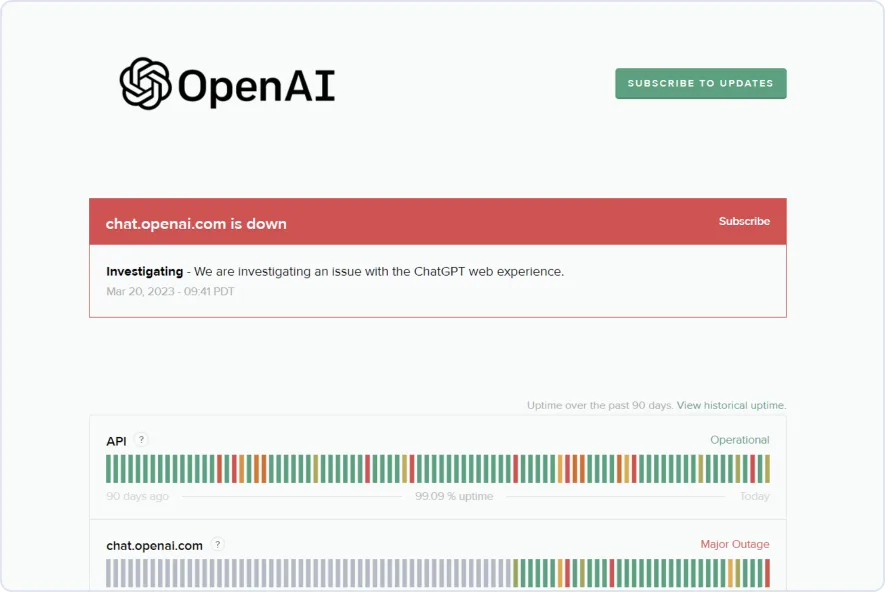
The most direct way is to visit OpenAI’s official status page, where the status of the service is indicated with different colors: red for total interruption and yellow for performance degradation. Mind you, it can take a few minutes for the information to update, especially right after the failure occurs.
For more immediate data, you can also check out third-party platforms like Downdetector. These sites collect real-time reports from users and display trend graphs. For example, in the fall of June 10, the number of reports exceeded 1,400 in a few minutes, coinciding almost exactly with the moment of the interruption.
Another reliable source is the social network X. Whenever there are problems with ChatGPT, numerous posts usually quickly appear when searching for “ChatGPT is down.” or “OpenAI“. In the OpenAI community on Reddit there are also users who share the failures they experience and the solutions they try.
If all these channels confirm that it is a widespread failure, the problem is most likely with the server, and in that case, all that remains is to wait patiently or use alternative tools (which I will mention later). On the other hand, if it seems that the glitch only affects you, you should check your internet connection, browser settings, or other local factors.

Try a stable and free ChatGPT
Claude 4 Opus and DeepSeek R1. These models deliver robust performance in writing, data analysis, and code generation.
If you’re not sure which model best suits your job, you can check out our guides and comparisons of AI tools, including analyses such as Perplexity vs. ChatGPT, which will help you find the most suitable option.
What to do if ChatGPT doesn’t work for you?
Check your internet connection
If you confirm that the problem is in your local environment, the first thing to do is to check that your connection is stable. ChatGPT requires a connection with good stability and low latency; even if other websites load normally, small fluctuations can affect its operation.
In addition, in some regions, internet providers apply restrictions or limit the quality of AI services, which can cause ChatGPT to load slowly or exhibit glitches. If your network environment—for example, at a business or educational institution—has strict firewall configurations, access to ChatGPT may be blocked.
In this case, you can try using a stable VPN that connects to nodes in the US or Europe. However, it is important to choose a reliable and consistent VPN service, as an unstable connection could make ChatGPT run even slower.

Clear your browser’s cache and cookies
Once connection issues have been ruled out, the next step is to check your browser’s cache. It stores images, scripts, and cookies to speed up page loading, but an outdated or corrupted cache can lead to display failures. In web applications that are frequently updated, such as ChatGPT, it is common for the stored content to conflict with the new version.
In Chrome, you can press Ctrl+Shift+Delete (on Mac, Cmd+Shift+Delete) to open the data erase panel. Check the “Cached images and files” and “Cookies and other site data” options, and select “Last 24 hours” as the time range. The procedure is similar in other popular browsers.
After clearing the cache, reopen ChatGPT; in many cases, this fixes the problem, especially when the page shows loading errors.

Switch browsers
If after clearing the cache the problem persists, try accessing ChatGPT from another browser, such as Firefox, Edge, or Safari. Before doing so, close any active ChatGPT sessions in the current browser to avoid conflicts with account information.
If the service works correctly in the new browser, you can continue to use it temporarily and be aware if future updates fix the bug. On the other hand, if the error reproduces in multiple browsers, it’s likely that the cause isn’t in the browser, and you should check your account status or other local settings.

Sign out and log back in
Another solution is to sign out and sign back in, which updates your access status and permission settings.
Session problems are more common than it seems. In particular, when OpenAI updates its servers or adjusts the permissions system, old tokens can become invalid even if the browser continues to use them. This can cause error messages or partial, unstable operation of ChatGPT.
In the ChatGPT interface, click on your profile picture in the bottom right corner and select “Log Out.” Then, enter your credentials again. If you’re signed in with a Google or Microsoft account, you may need to repeat the authorization process.
After logging in again, the system will restore the latest settings and permissions, which usually resolves failures resulting from an incorrect session state. This method is especially useful when you can open ChatGPT but get errors when trying to send messages.
Disable extensions
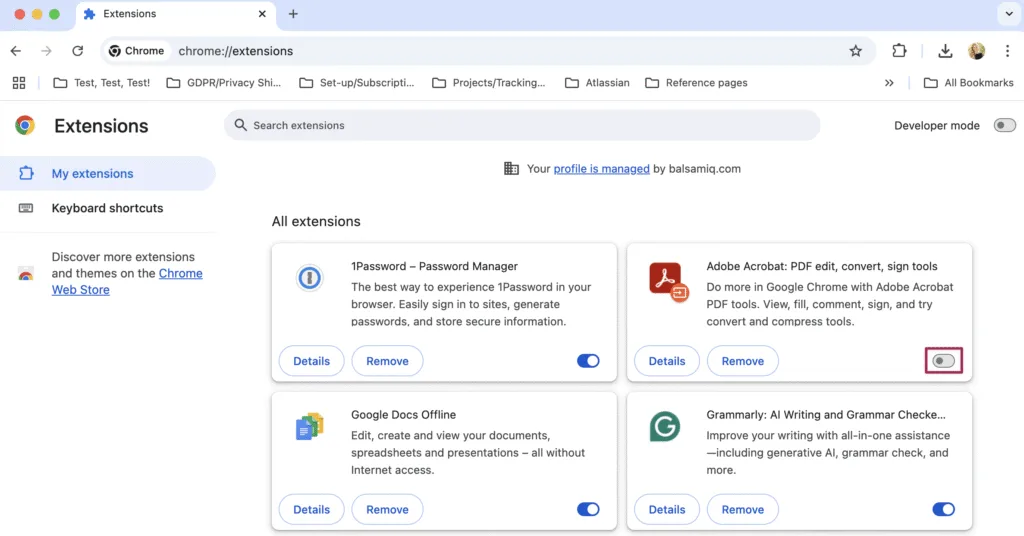
In many cases, ChatGPT’s problems are caused by third-party extensions. Ad blockers, privacy tools, and even some extensions that seem unrelated can interfere with its operation.
In Chrome, press Ctrl+Shift+N (on Mac, Cmd+Shift+N) to open an incognito window and access ChatGPT. If everything is working normally in this mode, it means that the problem is related to some extension or configuration of the browser.
To turn off extensions, click the ⋮ menu in the upper-right corner, go to More tools → Extensions, and turn off or remove any that you think are suspicious. You can disable them one by one and reload the page until you identify the one causing the problem.
If you don’t want to uninstall anything at the moment, you can continue to use incognito mode as a temporary solution.
Change model
If you are a paying user, when GPT-5 has problems, you can try manually switching to GPT-5 Thinking mode. This mode is usually more stable than standard GPT-5, especially when handling long conversations or complex tasks.
The change is simple: in the model selection menu at the top left of the chat page, click on the current GPT-5 model and select GPT-5 Thinking. After changing it, refresh the page and try again.
Contact OpenAI Support
If you have already tried all the solutions on your own, you may need to seek official help. However, the response from OpenAI support is usually somewhat slow, and you will usually be asked to repeat the basic steps you have already done first.
Go to help.openai.com and use the “Contact us” option to submit your request. Paid users usually have priority over free users, but even then the response time can vary between a few hours and several days.
When submitting your request, describe the problem in detail: when it started, the exact error message, and the solutions you’ve already tried. This will avoid receiving basic recommendations that you have already tried and speed up the process.
Conclusion
ChatGPT has become an essential tool for many people’s work and daily lives, and any interruption can disrupt your work rhythm. I hope this diagnostic and solution guide will help you quickly identify the cause and apply an effective method when you face similar problems.
Frequently asked questions about ChatGPT down
Q1. What should I look for in a GPT-5 Quick Fix vendor?
A1. Choose a vendor with proven reliability, 24/7 support, transparent pricing, and expertise in AI performance optimization to handle ChatGPT downtime effectively.
Q2. How can I ensure a vendor is trustworthy before signing up?
A2. Check verified client reviews, service uptime records, security certifications, and case studies that demonstrate consistent performance and successful GPT-5 quick fixes.
Q3. Why is it important to select a GPT-5 Quick Fix vendor before ChatGPT goes down?
A3. Preparing early ensures you have immediate support when outages occur, minimizing productivity loss and avoiding last-minute vendor selection under pressure.
Be a part of over Success!
- Stay ahead of the curve with the latest tech trends, gadgets, and innovations! Newsletter
- Follow me on Medium for more insights
- Write for Us on Technoluting (Medium)
Disclaimer : Some links in this article are affiliate links. We may earn a small commission at no extra cost to you. Thank you for supporting us!