







Not every new gadget lives up to the hype. I tested the Google Pixel Watch 4 and didn’t expect to find this flaw. Here’s what you should know before buying.
Table of Contents
Google has once again put meat on the grill. Apparently it is the same cut as always, but this time it has not been overlooked: it has achieved the ideal balance between juiciness and the point of the meat. The analogy falls short, as the big G has had to deal with many more relevant aspects, and even so, it has hit the nail on the head once and for all. I’ve been wearing the Pixel Watch 4 on my wrist for a week, one of the watches that, this time, has the weapons to compete head-to-head with the big players in the industry.
Historically, Pixel Watches have always had two unique features. A good one and a bad one. On the good side, a clearly differentiated design that bets on aesthetics and leaves aside that sporty tone that almost all smartwatches outside the Apple catalog have. The bad side has been unforgivable during previous generations, becoming a strong reason not to recommend Google watches. I am talking about autonomy.
If you like the design of the Pixel Watch, I have good news for you: Google has settled its pending account with autonomy, not only making it no longer a problem but also making it stand out for good. At least, in the version I’m testing: the Pixel Watch 4 with a 45mm face, the larger of the two sizes available.
Aesthetically, the Pixel Watch 3 and 4 are very similar, almost identical, you could say, but the reality when you delve into their novelties, and especially in the day-to-day tests, is that you find a new version that has been able to polish every aspect to improve and justify the new generation.
It’s still not perfect, and it’s far from the best in every aspect, but for those who value Google’s purest ecosystem, I have a lot to say about this Pixel Watch 4. Not all good, but I can tell you that it is a product for those users who were waiting for a blow on the table from the big G.
The same old design, but improved
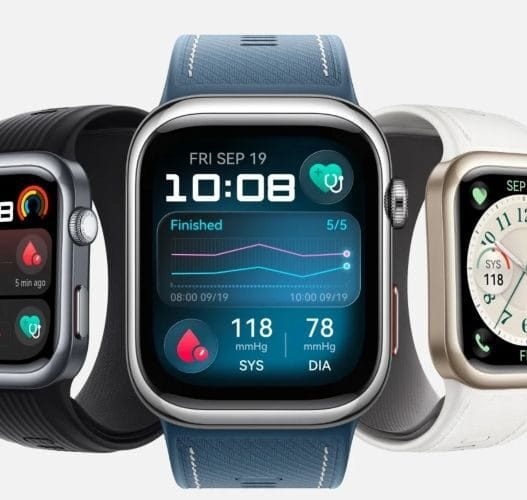
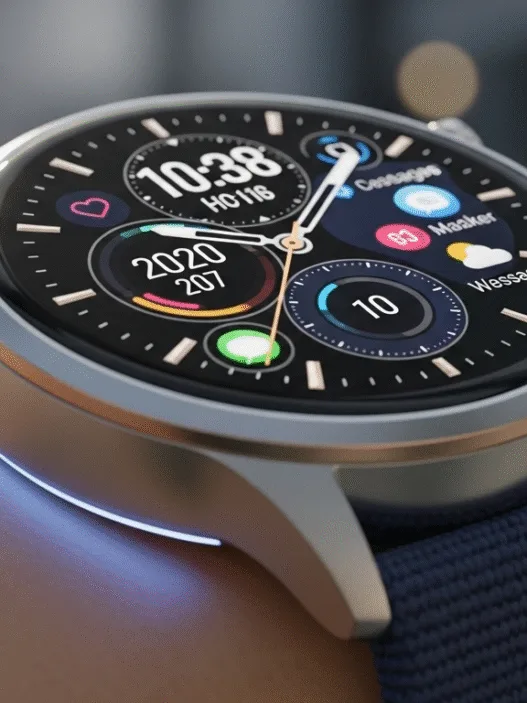
Google has not betrayed its principles. With mobile phones, the aesthetic lurches have been noticeable over the generations, but their watches continue to bet on the usual. The Pixel Watch 4 continues with its classic but effective rounded design and a clear protagonist: a curved screen and a glass that defies the rest of the options on the market.
The experience with this design is very good and quite different from what the rest of the brands and models offer, although it has its negative points quite defined: any blow goes directly to the glass, and there is no metal frame to protect the screen. Of course, Google has included Corning Gorilla Glass 5 protection to avoid scratches.
Its roundness and the zero edges of its body also make this Pixel Watch 4 one of the most comfortable smartwatches on the market. In addition to being light, it must be said. The 45 mm version weighs (without strap) only 37 grams, while the OnePlus Watch 3, for example, goes up to 50.1 grams.
However, not everything is exactly the same in this Pixel Watch 4. The clear example is on the left side of the watch, a place where two small charging pins that protrude slightly are now located. They are not seen much and on a day-to-day basis they go quite unnoticed, but the solution has slightly worsened the aesthetics.
In addition, this Pixel Watch 4 still has two things that don’t convince me: the button and the rotating crown. For starters, the button is small and very close to the crown, so pressing it, while not dramatic, offers an experience that can be improved.
On the other hand, I don’t like the fact that the crown is located in the center of the side (at 15:00) too much. To rotate it is indifferent, but to press the integrated button is not ideal. I think the position of other watches, such as the OnePlus Watch 3 or the Huawei GT6 Pro, which place this element at 14:00, seems to me a better solution.
These are minor details to sharpen an almost perfect design, but they are things that Google could point to on the list of things to improve for the future generation of watches.

Android Smartwatch with Heart Rate and Sleep Tracking – 30-Hour Battery – Fitness Tracking – Google AI – Champagne Gold Aluminum Case – Lemongrass Active Band – Wi-Fi
The Google Pixel Watch 4 display is sublime, but it still has the same old problem
Putting the list of features on the table, the Pixel Watch 4 has one of the best displays on the entire market. Considering the day-to-day experience, too. The brand has left nothing behind, offering a larger panel than the previous generation, narrower bezels, and a combination of technologies of the highest level.
The screen is AMOLED LTPO, so it can vary its frequency between 1 and 60 Hz, offering the maximum when you navigate the interface and the minimum when you view something static or are in Always On Display mode. It is not short in brightness either: it reaches up to 3,000 nits in specific conditions of sun hitting the clock and is capable of dropping to 1 nit when the AOD is activated.
The experience is worthy of the best watches on the market, allowing perfect viewing in any situation, sublime automatic brightness management, and an ideal optimization that is totally transparent to the user but that manages, together with a larger battery, to take the autonomy figures, this time, to the place they deserve.
Not everything is perfect, though. The Google Pixel Watch 4’s display still has the same problem as always: incredibly marked black frames. This year they are thinner, but the nature of their design makes them very present when you leave the watch faces designed by the company itself.
It’s no coincidence that all the default dials offered by Google are mostly black and without any kind of outer frame: the goal is that on a day-to-day basis you don’t know where the screen ends. And, although the visualization with these dark backgrounds is great, things change if you download some generic ones or place a photograph.
At the end of the day, the Pixel Watch 4’s bezels aren’t much different when you add in the black bezels and metal frame of any other watch, but this “infinity crystal” design has that downside: any dial that wasn’t designed for this watch will detract points from the aesthetics.
To top it off, although Google has some of these spheres in its catalog, the truth is that they are not enough. The company should give more options to alleviate that desire to download other watch faces and realize that the screen and design of the Pixel Watch 4 are no longer so attractive.
Now, having said that, the truth is that the improvement in the front-to-screen ratio has taken a giant leap compared to previous generations. It’s still somewhat disappointing when you notice, but it’s far from the cheap watch feel that was present in models like the Pixel Watch 2, for example.

Google has complied; the Pixel Watch 4 offers two days of battery life to spare
As I have already told you on several occasions during the text, I have good news: the design of Google watches is no longer subject to mediocre autonomy. Despite the increase in the screen, the company has managed to restructure its interior to include a larger battery that lasts longer.
How much more? The figure is surprising knowing where the Pixel Watch line comes from. The 45mm version has allowed me to squeeze it for two full days without any problem. In fact, in my tests I have used the watch more than usual (to see how it works), and I have done two 1.5-hour sports sessions both days.
The result? I have reached the end of the second day with 20% charge remaining, which makes me think that, without monitoring sport, the watch may be able to reach 3 days of autonomy. All this, be careful, with the Always On Display activated.
The leap that Google has made is to take its hat off, since autonomy has been the Achilles heel of watches with WearOS for years: one day it was the standard figure in almost all options. OnePlus hit the table by extending the daily life of its watches thanks to a dual operating system, and now Google itself has achieved the perfect balance between power, software, and battery.
Remember the charging pins I talked about earlier? Don’t be disappointed: they are responsible for making a larger battery fit inside and improving the Pixel Watch 4’s fast charging.
In fact, this last detail makes the watch charge up to 25% faster, which translates into being able to “refuel” 50% of the battery in about 15 minutes. In addition, the charger allows you to leave the Pixel Watch 4 in a kind of stand, so you can see the time as if it were an alarm clock or a small table clock.
Appearances can be deceiving. As soon as I took the Pixel Watch 4 out of the box, I frowned when I saw the charging pins “in the air,” but then I perfectly understood Google’s reasons for doing it, and I think it is an ingenious solution as well as tremendously functional.

Google is still not the queen of health and sports, a milestone that sells dearly in the industry
The health and sport of the Pixel Watch 4, as always, is linked to the Fitbit app. It’s not a bad thing, but rather the opposite. The interface is good, the data is consistent, and everything is shown clearly as well as explained. Now, as with previous Google watches, I’m clear that it’s not the ideal smartwatch if you want the best sports or health monitoring.
Don’t get me wrong: the results are accurate, the Pixel Watch 4 has sensors everywhere for a multitude of measurements, and it does everything quickly, but it is not the best at anything. Despite being one of the most expensive watches on the current scene, it has fewer sports (40) than its main competitors, the OnePlus Watch 3 and the Galaxy Watch 8.
And, although Fitbit is a fairly complete app, the metrics of certain sports also leave some key points that the competition does indicate. However, it is also clear to me that the Pixel Watch 4 monitors sports with enough precision and quality to satisfy 90% of the population. Of the remaining 10%, a small percentage will need to go for the OnePlus or Samsung of the day, but the vast majority of those nonconformists will have to go for professional options from Suunto or Garmin.
The Google Pixel Watch 4 is not a watch that I recommend buying for those who do a half marathon every day, but it is for the rest of us mortals who want a balance between a traditional watch design without great fanfare and accurate monitoring of their amateur races or padel matches.
“The Google Pixel Watch 4 is one of the few watches that allows you to monitor paddle.”
Switching to the health section, it cannot be said that the Pixel Watch 4 has fallen short in anything. There are options more focused on this segment, but Google has once again put all the meat on the grill: it does everything you can expect and has very high-quality sensors.
All the measurements (heart rate, SpO2, ECG, etc.) are fast, and although I have not been able to compare them with professional medical devices, the truth is that they fit quite well with the rest of the high-end watches that I have in the drawer. In addition, Google has done a good job this year, analyzing data from all sensors to bring a new feature to life: Fitbit Morning Brief.
This system produces a daily summary of your health and sports metrics, allowing you to know your physical condition and cardiovascular health at a glance. It is capable, for example, of rating your preparation for physical exercise and your cardiovascular load, as well as giving you a simple graph if the figures are positive or improvable.
Other details such as sleep measurement or warnings for possible stress are still present with a good dose of detail, but there is something that stands out among those hidden options in the health section: the Pixel Watch 4 is capable of detecting interruptions in the pulse and calling emergencies in the event of a cardiac arrest, a function that, luckily, I have not had to check, but that is nice to have as a bodyguard.

Gemini is the jewel in the crown on the Pixel Watch 4
This year Google Assistant has retired to make way for Gemini, the company’s new AI-based assistant. It has done so in all watches with WearOS, but the big G has saved certain exclusive features for the Pixel Watch 4 that make it the smartwatch that best manages artificial intelligence and voice requests.
For starters, Google has pulled out of its sleeve a new gesture that allows you to talk to the watch without using the “OK, Google” command. Just activate it from the settings and raise your wrist close to your face—you can start asking him for things directly. In addition, it works perfectly, although on certain occasions it is activated by mistake with a sudden movement of the arm.
What is Gemini capable of doing on the Pixel Watch 4? Well, AI is no longer an assistant to be asked to set an alarm or remember something: it is now sublimely integrated with the system, allowing you to control almost anything with your voice. It is possible to start monitoring any sport, ask it to remember something, to tell you what events you have on the calendar, to summarize the last email you received, to look for your mobile, or even join requests: “Turn on all the lights in the house and delete my last 10 emails.”
You can also ask them to tell you how your last workout went, create a Spotify playlist for running for 15 minutes, or give complex commands we’ve been dreaming of for a while: “Pause my running session, start monitoring a weight workout, and tell me how my heart rate is.”
All of this works surprisingly well, giving a thousand turns to Gemini’s integration of any other watch with WearOS. Google has done a meticulous job and has given the Pixel Watch 4 an intelligence and options that, in my opinion, change the way you use and interact with smartwatches.
It doesn’t end there: the Pixel Watch 4 also integrates a new AI-based feature that’s incredibly useful. These are the intelligent responses. Do you know those predefined options that appear to respond to an SMS or a WhatsApp? On all watches they are basic and address the typical “Yes,” “no,” “I’m busy,” or “I’m working” are answers.
Pixel Watch 4 now uses Gemini to read your messages and craft fully personalized smart replies. Use the context of the conversation to create 3 or 4 options that you can respond to with a single click. Imagine, for example, that your partner asks you on WhatsApp if you prefer to eat macaroni or mashed vegetables: the AI is able to generate two personalized responses based on that message.
The bad news is that it only works with Google’s latest mobiles, but it is another example of how to integrate artificial intelligence in a sublime way into an increasingly rounded product. Gemini on the Pixel Watch 4 is a giant leap, a feature that may go unnoticed in ads but that you fall in love with when you start taking advantage of it from the wrist.
FAQ from Content
Q1: What are the main drawbacks of the Google Pixel Watch 4?
A1: The Pixel Watch 4 suffers from poor battery life, minor lag during app usage, and limited improvements over the previous model, making it hard to justify an upgrade.
Q2: How does the Pixel Watch 4’s performance compare to its predecessor?
A2: While the Pixel Watch 4 offers slightly faster performance, it doesn’t provide a major leap in speed or efficiency compared to the Pixel Watch 3.
Q3: Is the design of the Pixel Watch 4 different from earlier versions?
A3: The design remains largely unchanged, retaining the same circular body and display style, with minimal refinements in build and comfort.
Be a part of over Success!
- Stay ahead of the curve with the latest tech trends, gadgets, and innovations! Newsletter
- Follow me on Medium for more insights
- Write for Us on Technoluting (Medium)
Disclaimer : Some links in this article are affiliate links. We may earn a small commission at no extra cost to you. Thank you for supporting us!